
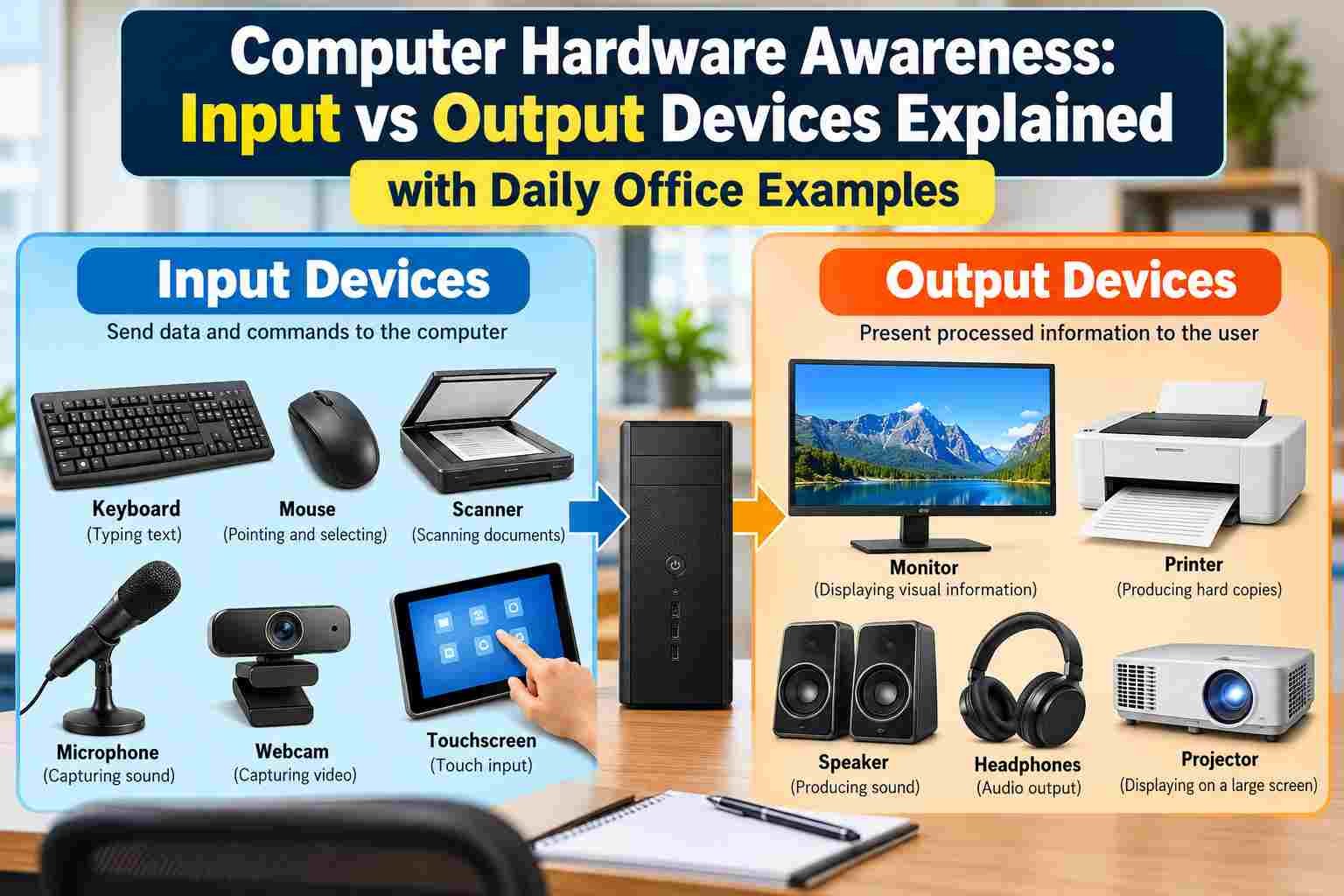
Computer hardware awareness starts with understanding the physical parts of a computer and the role each part plays. Among the most basic concepts is the difference between input and output devices. A keyboard, mouse, scanner, microphone, and webcam help a user send information to a computer, while a monitor, printer, speaker, and projector help the computer present information back to the user.
For students, office workers, teachers, and competitive-exam aspirants, this distinction is simple but important. Questions about input and output devices appear regularly in computer awareness sections, and the same knowledge is useful in daily office work. Knowing what each device actually does also makes it easier to understand how a complete computer system works.
This guide explains Computer Hardware Awareness through practical examples rather than difficult technical language. You will learn what input devices are, what output devices are, how they work, the difference between them, examples used in offices, common misconceptions, exam-focused points, and simple ways to remember the concepts.
Visit More:-
- Safe Internet Browsing Tips: Cyber Security Guide for Students & Office Workers
- Top 10 Daily Computer Tasks Every Office Clerk and Assistant Must Know
- Official File Naming Conventions & Folder Organization Tips
- How to Use Mail Merge in MS Word with Excel Data
- ASP.NET Explained: A Complete Beginner’s Guide to Web Development
What Is Computer Hardware Awareness?
Computer Hardware Awareness means having a basic understanding of the physical components of a computer system, their functions, their categories, and how they work together.
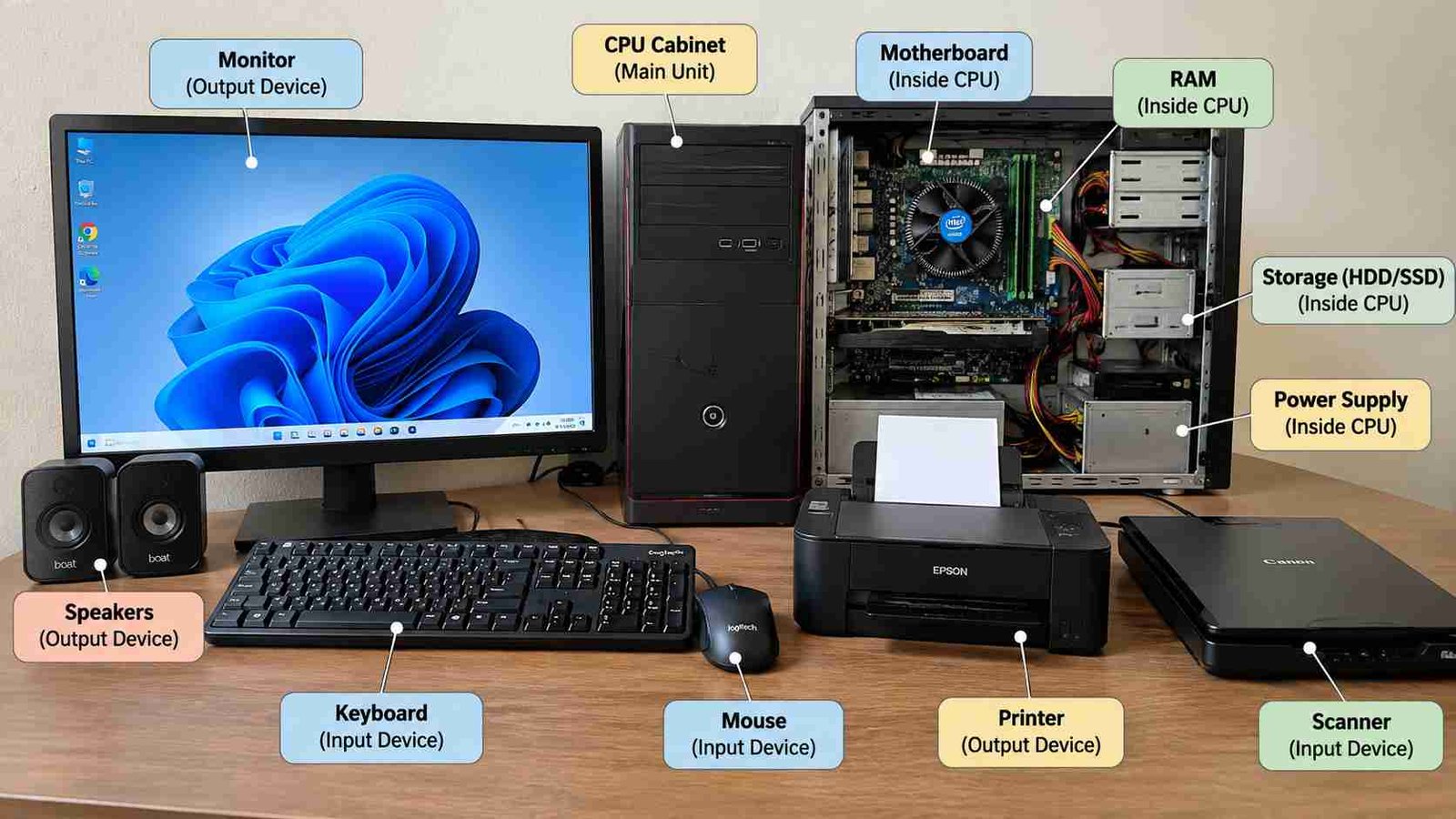
Hardware refers to the parts of a computer that can be physically seen or touched. Examples include the keyboard, mouse, monitor, CPU cabinet, printer, scanner, speakers, webcam, hard drive, RAM, motherboard, and other physical components.
Software, on the other hand, consists of programs and instructions that tell the hardware what to do. Windows, Microsoft Word, web browsers, media players, and accounting applications are examples of software.
A simple way to understand the relationship is:
Hardware = physical components
Software = instructions and programs
Input and output devices form an important part of hardware awareness because they create communication between the user and the computer.
What Are Input Devices?
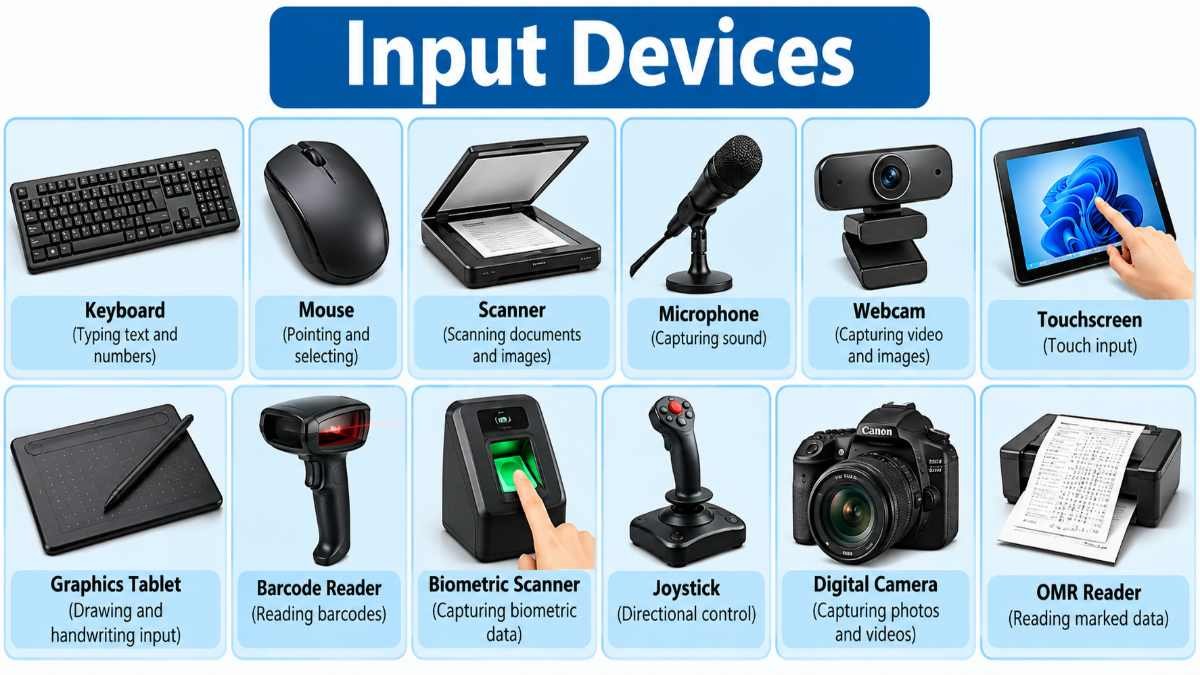
An input device is a hardware component used to enter data, commands, instructions, or other information into a computer.
Whenever you provide something to a computer, you generally use an input device. For example, typing your name into Microsoft Word using a keyboard is an input operation. Clicking a button with a mouse is also an input operation.
Input does not always mean typing text. A computer can receive many types of information, including:
- Text
- Numbers
- Images
- Sound
- Video
- Touch
- Biometric information
- Movement or position
- Scanned documents
The device used to provide that information is generally classified as an input device.
How Does an Input Device Work?
The basic process can be understood in three steps:
- The user provides information or a command.
- The input device converts that action into a form the computer can understand.
- The computer processes the information and performs an appropriate operation.
For example, when you type the letter A on a keyboard, pressing the key creates an electrical signal. The computer interprets the signal as a keyboard input and displays the corresponding character in the active application.
The same idea applies to other devices. A scanner captures a physical document, a microphone captures sound, and a mouse detects movement or clicks.
Common Input Devices and Their Uses
Understanding examples is one of the easiest ways to build strong Computer Hardware Awareness.
| Input Device | Main Function | Common Office Example |
|---|---|---|
| Keyboard | Enters text, numbers, and commands | Typing reports or emails |
| Mouse | Provides pointing and selection input | Opening files or selecting options |
| Scanner | Converts physical documents into digital images | Scanning certificates |
| Microphone | Captures sound | Online meetings |
| Webcam | Captures video/images | Video conferencing |
| Touchscreen | Accepts touch-based input | Kiosks and tablets |
| Barcode Reader | Reads printed barcodes | Inventory management |
| Biometric Scanner | Captures biometric data | Fingerprint attendance |
| Graphics Tablet | Accepts pen-based drawing input | Designing and illustration |
| Joystick | Detects directional control | Games and simulations |
Keyboard: The Most Common Input Device
A keyboard is one of the most widely used input devices. It allows users to enter letters, numbers, symbols, commands, and keyboard shortcuts.
In an office, a keyboard may be used for:
- Typing letters
- Writing reports
- Entering employee information
- Filling online forms
- Creating spreadsheets
- Using shortcut keys
- Searching for information
- Entering passwords
The keyboard also contains special keys such as Enter, Esc, Shift, Ctrl, Alt, Backspace, Delete, Function keys, and arrow keys.
For exam preparation, remember that a keyboard is an input device, even though some of its keys can perform actions that cause visible changes on the screen.
For example, pressing the Delete key changes the document, but the key itself still provides input to the computer.
Mouse: Pointing and Selection Device
A mouse is another common input device. It allows the user to move a pointer on the screen and interact with graphical interfaces.
Typical mouse actions include:
- Moving the pointer
- Left-clicking
- Right-clicking
- Double-clicking
- Dragging
- Scrolling
Suppose an office employee wants to open a PDF file. The employee moves the mouse pointer to the file and double-clicks it. The mouse sends the action to the computer, which then opens the file using the appropriate software.
The mouse is therefore an input device because the computer receives information about the user’s actions.
Scanner: Converting Paper Into Digital Form
A scanner is an input device that captures text, photographs, signatures, certificates, and other physical documents and converts them into a digital representation.
For example, a college office may scan a student’s admission document and store the scanned copy on a computer.
A scanner is often confused with a printer because both are used with paper. The difference is straightforward:
Scanner: Paper → Computer
Printer: Computer → Paper
This is one of the most useful distinctions to remember for computer-awareness examinations.
Microphone: Sound as Input
A microphone captures sound and sends it to the computer or another electronic system as input.
In an office meeting, a microphone allows your voice to enter a video-conferencing application. The computer receives the audio and transmits it to other participants.
Therefore:
Microphone = Input
Speaker = Output
This pair is worth remembering because students sometimes confuse them.
Webcam: Video and Image Input
A webcam captures photographs or video and provides that information to the computer.
Webcams are commonly used for:
- Online classes
- Video meetings
- Interviews
- Security applications
- Content creation
During an online interview, your webcam captures your image and sends the video data to the computer. The computer then processes and transmits it through the communication application.
Because it sends information into the computer, a webcam is an input device.
Touchscreen: Input or Output?
A touchscreen is a particularly interesting example because it can perform both input and output functions.
The display portion of a touchscreen provides visual output. At the same time, the touch-sensitive layer detects where the user touches the screen and sends that information into the system.
Therefore, a touchscreen can be considered a both input and output device.
This is an important exam point.
For example, when you tap an icon on a smartphone:
- Your touch is input.
- The display showing the application is output.
This dual role is why touchscreen devices cannot always be placed into only one category.
What Are Output Devices?
An output device is a hardware component that presents processed information from a computer to the user.
After receiving and processing data, the computer needs a way to communicate the result. Output devices perform this function.
Output can appear in different forms, such as:
- Text
- Images
- Graphics
- Sound
- Video
- Printed documents
For example, when you type a letter in Microsoft Word, the keyboard provides input. The computer processes your typing, and the monitor shows the result. The monitor is therefore an output device.
Common Output Devices
| Output Device | Main Function | Office Example |
|---|---|---|
| Monitor | Displays visual information | Viewing spreadsheets |
| Printer | Produces physical copies | Printing reports |
| Speaker | Produces audio | Playing meeting audio |
| Headphones | Provides audio output | Online meetings |
| Projector | Displays computer content on a large surface | Classroom presentation |
| Plotter | Produces large technical drawings | Engineering plans |
Monitor: The Main Visual Output Device
A monitor displays text, images, videos, software interfaces, and other visual information generated by a computer.
In a normal office environment, almost every computer-based task involves a monitor.
For example, when you open Excel, the spreadsheet displayed on the screen is output. When you type into a Word document, the characters appearing on the screen are also output.
The monitor does not generally send your typed information into the computer. It displays processed information from the system.
Therefore:
Monitor = Output Device
Modern monitors may use technologies such as LCD, LED, and other display technologies, but their basic role remains the same: providing visual output.
Printer: Computer Output on Paper
A printer produces a physical copy of digital information.
Suppose an employee prepares a salary statement in a spreadsheet. The data exists digitally inside the computer. When the employee selects Print, the printer receives the information and creates a paper document.
This makes the printer an output device.
Two common categories are:
Inkjet Printer
Inkjet printers use liquid ink and are commonly used for color printing and general document printing.
Laser Printer
Laser printers use toner and are widely used in offices where fast document printing is required.
For basic computer awareness, the most important fact is not the printing technology. It is that a printer converts computer-generated information into a physical output.
Speaker and Headphones: Audio Output
Speakers produce sound generated by a computer.
Examples include:
- Playing music
- Hearing a video
- Listening to an online class
- Hearing notification sounds
- Participating in a video conference
Headphones serve a similar purpose but usually provide audio directly to one person.
Both are output devices because sound is being presented from the computer to the user.
Remember the simple pair:
Microphone → Input
Speaker → Output
Projector: Enlarged Visual Output
A projector receives visual information from a computer and displays it on a larger surface such as a wall or projection screen.
Projectors are frequently used in:
- Classrooms
- Training rooms
- Conference halls
- Business presentations
- Seminars
If a teacher connects a laptop to a projector and displays a PowerPoint presentation, the projector is functioning as an output device.
The computer sends visual information outward, and the projector presents that information to the audience.
Plotter: Specialized Output Device
A plotter is a specialized output device designed to produce precise drawings, graphics, maps, and large technical documents.
Plotters may be used in areas such as:
- Architecture
- Engineering
- Mapping
- Technical design
A plotter is different from an ordinary office printer because it is generally associated with large or highly precise technical drawings.
For competitive examinations, remember:
Plotter = Output device
Input vs Output Devices: The Basic Difference
The easiest way to understand the difference is to think about the direction of information.
| Feature | Input Device | Output Device |
|---|---|---|
| Basic role | Sends information to the computer | Receives information from the computer |
| Communication direction | User → Computer | Computer → User |
| Main purpose | Enter data or commands | Present processed information |
| Examples | Keyboard, mouse, scanner | Monitor, printer, speaker |
| Typical result | Computer receives information | User sees/hears/gets information |
A simple rule is:
Input = Information goes into the computer
Output = Information comes out of the computer
This rule works for most basic questions.
Understanding Input and Output Through a Daily Office Example
Imagine an employee working in an office.
The employee receives a paper form from a customer and scans it using a scanner.
Scanner → Input
The digital document appears on the monitor.
Monitor → Output
The employee edits the document using a keyboard and mouse.
Keyboard → Input
Mouse → Input
The employee then sends the finished document to the printer.
Printer → Output
The employee joins a video meeting and speaks into a microphone.
Microphone → Input
The employee hears the other participants through speakers.
Speaker → Output
This single office scenario covers several major devices and demonstrates why classification is easier when you think about the direction of information.
A Simple Input-Process-Output Model
A computer system can be understood using a basic model:
Input → Processing → Output
For example:
Keyboard → CPU/Computer Processing → Monitor
Suppose you enter 25 + 15 using the keyboard.
The keyboard provides input.
The computer processes the calculation.
The monitor displays 40 as output.
Another example:
Scanner → Computer → Printer
A physical document is scanned.
The computer stores or processes the scanned image.
The printer produces a physical copy.
This model is useful for beginners because it connects individual devices to the larger functioning of a computer system.
Are Storage Devices Input or Output Devices?
Storage devices can cause confusion.
Devices such as hard disk drives, solid-state drives, USB flash drives, memory cards, and optical storage media are primarily used for storing data.
They are not normally classified as simple input or output devices in the same way as a keyboard or monitor.
A storage device can both read data and write data, so its role is broader than the basic input/output categories.
For example, a USB flash drive can transfer files to a computer and can also receive files from a computer.
For competitive exams, carefully read the wording of the question. If the question asks for a basic input device, keyboard or mouse is a straightforward answer. If it asks about storage devices, USB drives, HDDs, SSDs, and memory cards belong to the storage category.
Devices That Perform Both Input and Output
Some hardware can communicate with the computer in both directions.
Examples include:
- Touchscreen
- Multifunction printer
- Some communication devices
- Certain storage and networking hardware
A multifunction printer can print a document and scan a document. Printing provides output while scanning provides input.
A touchscreen can display information while also detecting touch.
This is why real-world hardware does not always fit perfectly into one simple category.
Why Is a Touchscreen Both Input and Output?
A touchscreen displays images and information, which is output. It also detects finger or stylus actions, which is input.
So, one physical device can provide two different types of interaction.
This is especially useful to remember because exam questions may ask whether a touchscreen is an input device, output device, or both.
Input and Output Devices in a Typical Office
A modern office may use dozens of hardware devices during a normal working day.
Consider the following workflow:
An employee logs into a computer using a keyboard.
Keyboard = Input
The employee moves through applications using a mouse.
Mouse = Input
A document is scanned.
Scanner = Input
The employee reviews the document on the screen.
Monitor = Output
A manager attends an online meeting.
Microphone = Input
The manager listens through headphones.
Headphones = Output
The final report is printed.
Printer = Output
A presentation is shown to a group.
Projector = Output
This example shows that input and output devices are not abstract textbook concepts. They are part of routine computer work.
Why Computer Hardware Awareness Is Important for Students
Computer hardware awareness is useful beyond a single examination question.
Students can use this knowledge to understand:
- How computers interact with users
- Why different peripherals are needed
- How office equipment works
- How digital information enters and leaves a system
- Basic troubleshooting concepts
- Computer fundamentals for exams
For example, if a keyboard stops working, the problem affects input. If the monitor does not display information, the problem affects visual output.
Knowing the role of each component helps identify where a problem may be occurring.
Computer Hardware Awareness for Competitive Exams
Computer awareness questions are common in various competitive examinations. The exact syllabus and question pattern can vary by examination authority and recruitment year, so candidates should always check the current official syllabus or notification for their particular exam.
For basic preparation, focus on understanding rather than memorizing long lists.
Important topics include:
- Input devices
- Output devices
- Storage devices
- CPU
- Memory
- Software
- Operating systems
- Networking basics
- Internet concepts
- Computer terminology
- Keyboard shortcuts
Common Exam-Type Questions
Which device is used to enter text into a computer?
Answer: Keyboard.
Which device displays information visually?
Answer: Monitor.
Which device converts a paper document into digital form?
Answer: Scanner.
Which device produces a hard copy?
Answer: Printer.
Which device captures sound as input?
Answer: Microphone.
Which device produces sound as output?
Answer: Speaker.
Which device can perform both input and output functions?
Answer: Touchscreen, depending on the context.
These questions become easy when the underlying concept is understood.
Memory Tricks to Remember Input and Output Devices
One of the easiest memory methods is to ask one question:
“Is the device giving information to the computer, or is the computer giving information to me?”
If you are giving information to the computer, think Input.
If the computer is giving information to you, think Output.
You can also memorize a few common pairs:
| Input | Output |
|---|---|
| Keyboard | Monitor |
| Mouse | Printer |
| Scanner | Speaker |
| Microphone | Projector |
| Webcam | Plotter |
Another useful memory rule is:
“Speak into microphone, hear from speaker.”
That immediately tells you:
Microphone → Input
Speaker → Output
Similarly:
“Scan into computer, print from computer.”
Scanner → Input
Printer → Output
Common Misconceptions About Input and Output Devices
“The monitor is an input device because I interact with it.”
A standard monitor is an output device because it displays information. However, a touchscreen combines display and touch input, making the complete device capable of both functions.
“A printer is an input device because I send a document to it.”
The document is sent from the computer to the printer. From the computer’s perspective, information is moving outward. Therefore, the printer provides output.
“A keyboard is output because words appear on the monitor.”
The appearance of the words on the monitor is output, but the keyboard is the device that sends the user’s keystrokes into the computer. Therefore, the keyboard is input.
“A scanner and printer do the same thing.”
They perform opposite basic operations.
A scanner turns a physical document into digital information.
A printer turns digital information into a physical document.
“Every device connected through USB is an input device.”
USB is a connection interface, not a device category.
A USB port can connect keyboards, mice, printers, storage devices, cameras, audio devices, and many other types of hardware.
Input vs Output Devices: Real-Life Examples
Example 1: Writing a Letter
You open a word-processing application and type a letter.
Keyboard → Input
Monitor → Output
You save the file to storage.
Storage device → Data storage
You print the letter.
Printer → Output
Example 2: Online Class
The webcam captures the teacher’s video.
Webcam → Input
The microphone captures the teacher’s voice.
Microphone → Input
The screen shows the class.
Monitor → Output
The speakers produce sound.
Speaker → Output
Example 3: Bank or Office Counter
An employee scans a customer’s document.
Scanner → Input
The document appears on the monitor.
Monitor → Output
The employee enters customer details using a keyboard.
Keyboard → Input
The final receipt is printed.
Printer → Output
Example 4: Presentation
A presenter prepares slides using a keyboard and mouse.
Keyboard and mouse → Input
The presentation is displayed on the monitor.
Monitor → Output
The same presentation is shown to a large audience through a projector.
Projector → Output
These examples make the classification much easier than memorizing definitions alone.
How Input and Output Devices Work Together
A computer system becomes useful because its components work together.
A keyboard alone cannot create a complete computing experience. The computer needs processing hardware and a method to present results.
Similarly, a monitor can display information, but it depends on the computer and software to generate that information.
This creates a chain:
User → Input Device → Computer Processing → Output Device → User
For example:
Employee → Keyboard → Computer → Monitor → Employee
The employee provides information through the keyboard. The computer processes it. The monitor shows the result back to the employee.
This continuous exchange is the foundation of human-computer interaction.
Difference Between Hard Copy and Soft Copy
The concepts of input and output are also closely connected with hard copy and soft copy.
A soft copy is digital information that can be viewed or stored electronically.
Examples include:
- PDF files
- Word documents
- Digital photographs
- Spreadsheets
A hard copy is a physical printed version of information.
For example, a document displayed on a monitor is a soft copy. When the same document is printed, the printed paper is a hard copy.
The printer is responsible for producing the hard copy.
This distinction is especially useful in office administration and computer-awareness questions.
How to Identify a Device in an Exam
When you see an unfamiliar hardware device in a question, do not immediately try to memorize its category. Instead, determine what it does.
Ask:
- Does it send data into the computer?
- Does it present information from the computer?
- Does it store information?
- Does it process information?
- Does it perform more than one function?
This approach helps with devices you may not have studied in detail.
For example, a barcode reader captures a barcode and sends the information to the computer.
Therefore, it is an input device.
A projector receives visual information from the computer and displays it to the audience.
Therefore, it is an output device.
Common Mistakes Students Should Avoid
Students often lose easy marks because they memorize device names without understanding their functions.
One common mistake is confusing microphone and speaker. Remember that you speak into a microphone and hear through a speaker.
Another mistake is confusing scanner and printer. Remember:
Scanner: physical → digital
Printer: digital → physical
A third mistake is assuming that a device’s physical location determines whether it is an input or output device. Classification depends on the function of the device, not where it is placed.
Another problem occurs when students see a touchscreen. Instead of choosing input or output automatically, remember that it can perform both functions.
It is also a mistake to assume that every peripheral belongs to the same category. Computers have separate categories for processing, memory, storage, input, and output.
Practical Tips for Learning Computer Hardware
Learning hardware becomes easier when you connect every device with a real-life action.
Do not memorize:
“Keyboard is an input device.”
Instead, think:
“I use a keyboard to send text and commands to the computer.”
Do not memorize:
“Printer is an output device.”
Think:
“The computer sends a document to the printer to create a paper copy.”
This action-based learning method creates a stronger mental connection.
You can also practice by looking around your study room or office and identifying hardware.
For each device, ask:
What does this device receive?
What does this device send?
What is its main purpose?
This simple exercise can improve practical computer understanding.
Quick Revision Table
| Device | Category | Easy Way to Remember |
|---|---|---|
| Keyboard | Input | Type into computer |
| Mouse | Input | Control pointer |
| Scanner | Input | Paper into computer |
| Microphone | Input | Voice into computer |
| Webcam | Input | Video into computer |
| Monitor | Output | Computer displays information |
| Printer | Output | Computer prints information |
| Speaker | Output | Computer produces sound |
| Projector | Output | Computer displays large visuals |
| Plotter | Output | Produces technical drawings |
| Touchscreen | Both | Display + touch input |
Important Points to Remember
For quick revision, keep these concepts in mind:
- Input devices send data, commands, or information to a computer.
- Output devices present processed information to the user.
- Keyboard and mouse are common input devices.
- Scanner converts physical documents into digital information.
- Microphone captures sound as input.
- Webcam captures images or video as input.
- Monitor provides visual output.
- Printer produces a physical copy of digital information.
- Speakers and headphones provide audio output.
- Projectors provide visual output on a larger surface.
- A touchscreen can provide both input and output.
- Scanner and printer perform opposite basic functions.
- USB is an interface and should not automatically be treated as an input category.
- Storage devices are generally considered a separate hardware category.
- The basic computer model is Input → Processing → Output.
Frequently Asked Questions
What is Computer Hardware Awareness?
Computer Hardware Awareness is the basic understanding of physical computer components, their functions, categories, and roles in a computer system. It includes knowledge of devices such as keyboards, monitors, printers, scanners, memory, storage, and other hardware.
What is an input device?
An input device is hardware that allows a user to provide data, commands, or other information to a computer. Common examples include keyboards, mice, scanners, microphones, and webcams.
What is an output device?
An output device is hardware that presents information processed by a computer to the user. Common examples include monitors, printers, speakers, headphones, projectors, and plotters.
Is a keyboard an input or output device?
A keyboard is an input device. It sends typed characters, numbers, commands, and other key actions to the computer.
Is a monitor an input or output device?
A standard monitor is an output device because it displays information generated or processed by the computer.
Is a printer an input or output device?
A printer is an output device because it receives digital information from the computer and produces a physical printed result.
Is a scanner an input or output device?
A scanner is an input device because it captures information from a physical document and sends a digital representation of that information to the computer.
Is a touchscreen an input device or output device?
A touchscreen can perform both input and output functions. It displays information as output and detects touch actions as input.
Is a microphone an input device?
Yes. A microphone is an input device because it captures sound and sends the audio information into the computer or connected system.
Is a speaker an input device?
No. A speaker is an output device because it converts computer-generated audio information into sound that the user can hear.
What is the difference between a scanner and a printer?
A scanner converts a physical document into digital information, while a printer converts digital information into a physical printed copy. In simple terms, scanner means paper to computer, while printer means computer to paper.
Why are input and output devices important?
Input and output devices allow humans and computers to communicate. Input devices send information to the computer, while output devices present the processed results back to the user. Without these functions, normal interaction with a computer would be much more difficult.
Conclusion
Understanding input and output devices is one of the foundations of Computer Hardware Awareness. The concept becomes much easier when you stop treating the device names as a list to memorize and start thinking about the direction of information.
A keyboard, mouse, scanner, microphone, and webcam primarily provide input to a computer. A monitor, printer, speaker, projector, and plotter primarily provide output. Some modern devices, such as touchscreens and multifunction equipment, can perform both roles.
The most useful rule to remember is simple: input goes into the computer, while output comes from the computer to the user. Once this idea is clear, many computer-awareness questions become easier to solve.
For students and competitive-exam aspirants, combining definitions with practical office examples is an effective way to remember the topic. Whenever you use a keyboard to type, a scanner to digitize a document, a monitor to view information, or a printer to create a paper copy, you are seeing the input-process-output model in action.
Strong Computer Hardware Awareness is not only about answering exam questions. It also gives you a clearer understanding of the devices you use for study, communication, office work, and everyday digital tasks.
1 thought on “Computer Hardware Awareness: Input vs Output Devices Explained”