
A well-organized computer can save more time than many people realize. Office workers create, download, edit, share, and archive dozens of files every week. Reports, invoices, spreadsheets, presentations, meeting notes, applications, certificates, project documents, and scanned records can quickly become difficult to manage when every file is saved with a random name.
A file named Document1.docx may seem harmless when it is first created. A few months later, however, finding the right version among files such as Document1, Document1-final, Document1-new, and Document1-final-new can become frustrating. The problem becomes even larger when several employees work on the same project or when documents need to be retained for a long period.
This is where Official File Naming Conventions become useful. A clear naming convention gives every file a predictable structure. Instead of relying on memory, employees can understand a file’s purpose, subject, date, status, and version simply by looking at its name. When this approach is combined with a sensible folder hierarchy, everyday document management becomes faster, cleaner, and less error-prone.
This guide explains how to create practical file names, organize folders, handle document versions, choose dates and numbers consistently, avoid common mistakes, and build a file-management system that works for offices, educational institutions, small businesses, and personal workspaces.
Visit More:-
- MS Word Tutorial
- MS Excel Tutorial
- MS PowerPoint Tutorial
- MS Paint Tutorial
- Safe Internet Browsing Tips: Cyber Security Guide for Students & Office Workers
- Top 10 Daily Computer Tasks Every Office Clerk and Assistant Must Know
- Computer Hardware Awareness: Input vs Output Devices Explained
What Are Official File Naming Conventions?
Official File Naming Conventions are agreed rules for naming digital files in a consistent and meaningful way. These rules define what information should appear in a file name, how that information should be ordered, which characters should be avoided, and how versions or dates should be represented.
For example, instead of saving a document as:
report final.docx
a structured naming convention might produce:
Sales_Report_2026-09_Final.docx
The second name immediately tells the user what the file is, what period it belongs to, and which version it represents.
A good naming convention normally answers some basic questions:
- What is the document?
- Which project, department, subject, or client does it belong to?
- What date or reporting period does it represent?
- What version is it?
- What status does it have?
- Is it a draft, approved document, or final record?
The exact structure can vary from one organization to another. The important part is consistency.
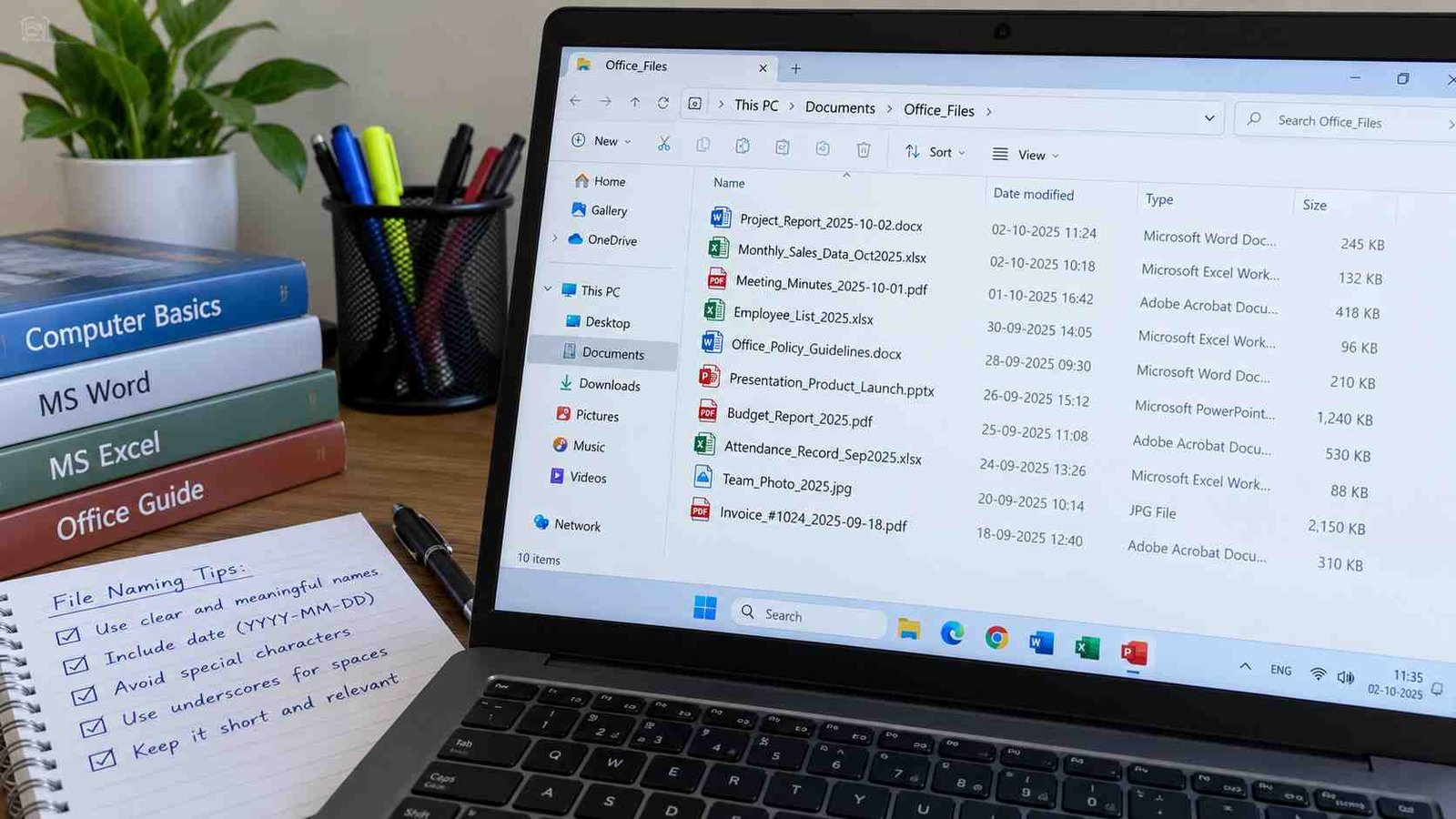
Why Are Official File Naming Conventions Important?
A naming system may look like a small administrative detail, but it can have a major effect on daily productivity. When files are named consistently, employees spend less time searching, comparing, renaming, and opening documents simply to discover what they contain.
Faster file searching
A descriptive file name is easier to locate using Windows Search, macOS search, cloud-storage search, or an office document-management platform.
Suppose you are looking for the monthly attendance report for August 2026. Searching for Attendance_August_2026 is much more useful than searching for a generic name such as Report2.
A predictable naming structure also makes search filters more effective. When dates, project codes, department names, and document types are used consistently, multiple related files can be identified quickly.
Reduced confusion between versions
Version confusion is one of the most common office-document problems. Employees may accidentally edit an older document because filenames do not indicate which file is current.
Compare these names:
Presentation.pptxPresentation-New.pptxPresentation-Final.pptxPresentation-Final2.pptx
with:
Training_Presentation_2026-09_v01.pptxTraining_Presentation_2026-09_v02.pptxTraining_Presentation_2026-09_v03.pptx
The second approach provides a clear progression.
Better teamwork
When several people work on the same folder, consistent file names allow everyone to understand the document collection without depending on the person who created it.
A new employee should be able to open a project folder and recognize what the files are for. A good naming system makes the folder understandable even to someone who was not involved in the original work.
Easier archiving
Documents often need to be kept for months or years. A file structure that works today should also make sense later.
A filename containing the project, period, and document type provides useful context even if the file is separated from its original folder.
Fewer accidental duplicates
Messy filenames encourage users to create unnecessary copies. A person may download the same file several times and end up with names such as:
Invoice.pdf
Invoice (1).pdf
Invoice (2).pdf
Invoice Latest.pdf
A consistent naming system helps users distinguish intentional versions from accidental duplicates.
What Makes a Good File Name?
A good file name should be clear, consistent, concise, searchable, and predictable.
The goal is not to make every filename extremely long. The goal is to include enough information to identify the file without opening it.
A practical naming pattern can look like this:
Project_DocumentType_Date_Version_Status
For example:
HR_Policy_Update_2026-10_v02_Draft.docx
This filename contains several useful elements:
| Element | Example | Purpose |
|---|---|---|
| Department/Project | HR | Identifies the area |
| Document Type | Policy Update | Describes the content |
| Date | 2026-10 | Shows the relevant period |
| Version | v02 | Identifies the revision |
| Status | Draft | Shows the document stage |
Not every file needs every element. A simple spreadsheet may only need a project name and date, while a formal policy document may require a version and approval status.

How Should You Design Official File Naming Conventions?
Before creating a naming standard, decide which information is consistently useful for your office.
Start with the document’s purpose
The first meaningful part of a filename should normally identify the document itself.
Examples include:
AttendanceInvoiceMeeting_NotesProject_PlanTraining_MaterialApplication_FormExpense_Report
Avoid vague descriptions such as File, Work, Data, or Stuff.
Add a project or department identifier
If an organization handles multiple projects, a project or department code can make files easier to locate.
Examples:
FIN_Expense_Report_2026-09.xlsx
HR_Joining_Checklist_2026-09.docx
PRJ_Website_Redesign_2026-09.pptx
For larger offices, short standard codes can be helpful. However, employees should know what the codes mean. A code that only one employee understands creates a different kind of confusion.
Use dates consistently
Dates are one of the most useful parts of a filename, but they should follow a single format.
A practical format is:
YYYY-MM-DD
For example:
2026-10-02
This arrangement has an important organizational advantage: year, month, and day progress from largest to smallest unit. When filenames are sorted alphabetically, files often appear in chronological order.
For monthly documents, you may use:
2026-10
For year-only records:
2026
Avoid switching between formats such as:
02-10-2026
10-02-2026
2 October 2026
unless your organization has a specific reason to do so.
A single date format makes filenames easier to interpret.
When Should Dates Be Included in File Names?
Dates are especially useful for files that change over time or represent a specific event.
Use dates for documents such as:
- Monthly reports
- Meeting minutes
- Expense records
- Attendance sheets
- Applications
- Invoices
- Project updates
- Audit records
- Training sessions
- Examination documents
- Event plans
For example:
Department_Meeting_2026-10-02.docx
is more informative than:
Department_Meeting.docx
However, not every file needs a date. A reusable blank template may remain:
Leave_Application_Template.docx
Adding today’s date to a permanent template may actually make the filename less useful.
How Should Versions Be Managed?
Version control becomes important whenever a document goes through repeated edits.
A simple version system is:
v01v02v03v04
For example:
Annual_Report_2026_v01.docx
Annual_Report_2026_v02.docx
Annual_Report_2026_v03.docx
When a document is formally approved, you can use a status indicator:
Annual_Report_2026_v04_Approved.docx
Avoid using words like “final” repeatedly
One of the most common office naming mistakes is creating files such as:
Report_FinalReport_Final2Report_Final_NewReport_Final_UpdatedReport_Final_Really_Final
This system breaks down because “final” does not describe a controlled version.
A better approach is to use numerical versions and reserve status words for meaningful stages.
For example:
Budget_2027_v01_Draft.xlsx
Budget_2027_v02_Review.xlsx
Budget_2027_v03_Approved.xlsx
This structure separates version from status.
Draft, Review, Approved, and Archived Statuses
Not every office needs status labels, but they can be useful in workflows where documents move through formal stages.
Common status terms include:
DraftReviewApprovedPublishedArchived
The important rule is to establish a fixed vocabulary.
For example, do not allow one employee to use Completed while another uses Final and another uses Approved for the same stage. Select the organization’s preferred term and use it consistently.
What Characters Should Be Avoided in File Names?
Different operating systems, cloud platforms, applications, and file-sharing services have different limitations. A practical naming convention should therefore avoid unnecessary special characters.
For broad compatibility, many organizations prefer:
- Letters
- Numbers
- Underscores
_ - Hyphens
- - Periods only when needed for the file extension
Avoid using complicated punctuation in routine file names.
A safer example is:
Client_Invoice_2026-10_v02.pdf
instead of:
Client/Invoice: October 2026 (Final)?.pdf
Simple filenames are easier to type, search, share, and process.
Avoid unnecessary spaces when consistency matters
Spaces are not inherently bad for normal office use, but an organization may prefer underscores or hyphens for consistency.
For example:
Employee_Joining_Form_2026-10.docx
or
Employee-Joining-Form-2026-10.docx
Either can work. The important thing is to choose one style and apply it consistently.
How Should Folder Organization Work?
Good filenames are only half of an effective document-management system. A folder structure should also follow a logical hierarchy.
A practical office folder structure may look like this:
Company Documents
→ 2026
→ Finance
→ Invoices
→ 2026-10
→ relevant invoice files
Another project-oriented structure may look like:
Website Project
→ 01_Planning
→ 02_Design
→ 03_Content
→ 04_Development
→ 05_Testing
→ 06_Reports
→ 07_Archive
Numbered folders are useful when a project has a natural sequence. They help maintain the intended order when the operating system sorts folder names alphabetically.

How Deep Should Folder Structures Be?
Folders should provide enough organization without forcing users to click through a maze of directories.
For example, a deeply nested structure might look like:
Company > Department > Project > Client > Year > Month > Document Type > Review > Draft
If every file is buried seven or eight levels deep, locating it can become frustrating.
A simpler structure could be:
Department > Project > Year > Document Type
Then rely on consistent filenames for additional detail.
A useful principle is:
Use folders for broad categories and filenames for specific identification.
Folders answer “Where does this belong?”
Filenames answer “Exactly what is this?”
Examples of Practical Folder Structures
Different types of office work require different structures.
General office structure
Office_Documents
├── Administration
├── Finance
├── Human_Resources
├── Operations
├── Projects
└── Archive
Project structure
Project_Alpha
├── 01_Planning
├── 02_Research
├── 03_Design
├── 04_Development
├── 05_Testing
├── 06_Final
└── 99_Archive
Academic or student structure
College
├── 01_Semester_1
│   ├── Notes
│   ├── Assignments
│   ├── Presentations
│   └── Exams
├── 02_Semester_2
│   ├── Notes
│   ├── Assignments
│   ├── Presentations
│   └── Exams
└── Certificates
Job-search structure
For job aspirants, a structured folder system can reduce confusion during application season:
Job_Search
├── Resume
├── Cover_Letters
├── Applications
├── Admit_Cards
├── Results
├── Certificates
└── Documents
Within Applications, files can be named by organization and date:
Bank_Clerk_Application_2026-09.pdf
Teaching_Recruitment_Application_2026-10.pdf
This is particularly useful when applying to multiple organizations at the same time.
Official File Naming Conventions for Students
Students can benefit from the same principles used in professional workplaces.
Instead of:
assignment.docx
use:
Computer_Applications_Assignment_2026-10-02.docx
For a project:
Science_Project_Water_Conservation_v01.docx
For presentation files:
History_Project_Presentation_v02.pptx
A semester folder could contain:
Semester_1
├── English
├── Computer
├── Mathematics
├── Science
└── Projects
This creates a simple digital filing system that remains useful during exams and later revision.
Official File Naming Conventions for Competitive-Exam Aspirants
Exam preparation often involves PDFs, applications, admit cards, answer keys, scorecards, certificates, and notes from multiple exams.
Instead of downloading everything into one folder, create separate categories.
For example:
Competitive_Exams
├── Banking
├── SSC
├── Railway
├── Teaching
├── State_Government
└── Other
Inside each exam folder, use meaningful names:
SBI_Clerk_2026_Admit_Card.pdf
SBI_Clerk_2026_Prelims_Result.pdf
SBI_Clerk_2026_Syllabus.pdf
SBI_Clerk_2026_Answer_Key.pdf
This makes important documents easier to identify when a deadline is approaching.
How Can Office Workers Organize Downloads?
The Downloads folder often becomes the most disorganized location on a computer.
A practical workflow is to treat Downloads as a temporary inbox rather than a permanent storage area.
For example:
- Download the document.
- Check what it is and whether it is needed.
- Rename it according to the naming standard.
- Move it to the appropriate project or department folder.
- Delete unnecessary duplicates.
Instead of leaving 500 files in Downloads, move important documents into their proper locations.
This simple habit can dramatically reduce clutter.
How Should Shared Folders Be Organized?
Shared folders require stronger naming discipline because multiple people access the same files.
A shared project directory might include:
Shared_Project
├── 01_Admin
├── 02_Source_Files
├── 03_Working_Documents
├── 04_Review
├── 05_Approved
└── 99_Archive
The Approved folder should ideally contain only documents that have reached the organization’s approved stage. Working drafts should stay elsewhere.
This reduces the chance that someone accidentally distributes or edits a document that was not intended for final use.
File Naming for Reports
Reports often contain dates, departments, and reporting periods.
Useful patterns include:
Sales_Report_2026-09.xlsx
Attendance_Report_2026-09.xlsx
Monthly_Finance_Report_2026-09_v02.xlsx
For annual reports:
Annual_Performance_Report_2026_v01.docx
For reports covering a date range:
Project_Update_2026-09-01_to_2026-09-30.docx
The right pattern depends on how users search for documents later.
File Naming for Meeting Notes
Meeting records are easier to manage when the date and meeting subject are visible.
Examples:
Team_Meeting_2026-10-02.docx
Project_Alpha_Meeting_2026-10-02.docx
Client_Review_Meeting_2026-10-02.docx
If several meetings occur each week, a consistent date-first or topic-first format can be selected.
File Naming for Financial Documents
Financial documents benefit from clear identifiers because users often need to find a specific invoice, purchase order, expense report, or payment record.
Examples:
VendorA_Invoice_2026-10-001.pdf
Office_Supplies_Expense_2026-10-02.xlsx
Project_Alpha_Budget_2026_v03.xlsx
A unique reference number may be more useful than a descriptive sentence when dealing with large transaction volumes.
File Naming for Human Resources Documents
HR records often include employee information and may require controlled access. Naming conventions should therefore remain useful without exposing unnecessary personal information.
Examples:
Employee_ID_Joining_Form_2026-09.pdf
HR_Onboarding_Checklist_2026-10.docx
HR_Training_Record_2026-09.xlsx
Organizations should also follow their internal privacy and access-control policies. A good filename does not replace proper security practices.
Folder Organization and Cloud Storage
Cloud platforms make document sharing convenient, but they also make consistent organization more important.
When files are stored in cloud systems, users may search by filename rather than browse through folders. This increases the value of descriptive names.
A practical cloud structure could be:
Company_Drive
├── Departments
│   ├── Finance
│   ├── HR
│   └── Operations
├── Projects
│   ├── Project_A
│   └── Project_B
└── Archive
Cloud storage can also generate duplicate copies when files are downloaded, uploaded, or synchronized across devices. Clear names help users recognize whether a file is actually a new version.
How Should You Handle Duplicate Files?
Not every duplicate filename means the documents are identical.
For example:
Policy_2026_v02.docx
and
Policy_2026_v02_copy.docx
may contain the same information, but they may also differ.
Before deleting a duplicate, compare:
- File contents
- Modified date
- File size
- Version number
- Approval status
- Source or creator
Do not automatically delete files simply because their names appear similar.
A naming system works best when combined with a clear document-retention process.
What Is the Difference Between File Naming and Folder Organization?
File naming and folder organization solve related but different problems.
| Area | Main Purpose | Example |
|---|---|---|
| File naming | Identifies an individual file | Sales_Report_2026-09.xlsx |
| Folder organization | Groups related files | Finance > Monthly Reports |
| Version control | Tracks document changes | v01, v02, v03 |
| Status labeling | Shows document stage | Draft, Approved |
| Archiving | Separates inactive records | Archive > 2025 |
Think of a folder as a cabinet and a filename as the label on an individual file inside the cabinet.
A good cabinet with poor labels is difficult to use. Good labels inside a chaotic cabinet are also difficult to manage. Both systems need to work together.
Common File Naming Mistakes to Avoid
Using vague names
Names such as New.docx, Work.xlsx, and Important.pdf do not provide enough information.
Using inconsistent dates
Mixing date formats makes sorting and interpretation harder.
Overusing “final”
A document is often edited after someone calls it final. Numerical versions are more reliable.
Creating extremely long filenames
A filename should contain meaningful information, not the entire history of the document.
Instead of:
This_is_the_latest_updated_version_of_the_monthly_sales_report_for_the_head_office_sent_by_the_manager.docx
use:
Sales_Report_2026-09_v03_Approved.docx
Using unclear abbreviations
A short code is useful only when people understand it.
Saving everything in one folder
Hundreds or thousands of files in one directory quickly become difficult to manage.
Keeping obsolete versions forever
Old versions can be valuable, but not every temporary copy needs permanent storage.
Renaming files differently for personal preference
Shared systems require shared rules. Personal naming styles can create confusion in team environments.
How Can You Create a Simple Office Naming Standard?
An office does not need a complicated 20-page policy to begin.
A basic standard can include five decisions:
1. File name order
For example:
Department_Project_Document_Date_Version_Status
2. Date format
Use:
YYYY-MM-DD
or another organization-approved standard.
3. Version format
Use:
v01, v02, v03
4. Status vocabulary
Choose approved terms such as:
Draft, Review, Approved, Archived
5. Character rules
Define which characters and spacing styles employees should use.
Write these rules in a short internal guide and apply them consistently.
A Recommended File Naming Formula
For many offices, this formula is flexible enough for everyday documents:
[Department/Project][Document Type][Date][Version][Status]
For example:
Finance_Budget_2026-10_v03_Review.xlsx
Another example:
HR_Training_Report_2026-09_v02_Approved.docx
For a simple file where fewer details are necessary:
Meeting_2026-10-02.docx
The best naming convention is not the one with the most information. It is the one that provides the right information consistently.
How Can Students Remember a File Naming System?
A simple memory trick is to think:
What + Where + When + Which + Status
- What — What is the file?
- Where — Which project, department, course, or subject?
- When — What date or period?
- Which — Which version?
- Status — What stage is it in?
For example:
Mathematics_Assignment_2026-10-02_v02_Submitted.docx
The filename tells the story of the document without requiring the user to open it.
Practical File Organization Tips for Office Workers
Small daily habits can make a large difference.
Keep permanent files out of Downloads
Move important files into their proper location soon after downloading them.
Use templates
Create standard templates for reports, letters, meeting minutes, invoices, and presentations.
Archive completed work
Move inactive documents out of working folders so active directories stay clean.
Review folders regularly
A monthly or quarterly cleanup can identify duplicates, outdated drafts, and misplaced files.
Keep shared rules visible
A short naming guide can be stored in a shared folder so new employees can consult it.
Don’t create a new naming system for every project
Whenever possible, build on a common organization-wide standard.
Make filenames searchable
Use meaningful words that employees are likely to search for later.
A Before-and-After Example
Consider a folder with these files:
final report.docx
new report.docx
report latest.docx
report final new.docx
report2.docx
updatedreport.docx
A user cannot immediately tell which file is current.
After applying a naming convention:
Sales_Report_2026-09_v01_Draft.docx
Sales_Report_2026-09_v02_Review.docx
Sales_Report_2026-09_v03_Approved.docx
The second group is easier to understand, sort, search, and maintain.
The biggest improvement is not the filename itself. It is the consistency behind the filename.
How File Naming Can Improve Productivity
Good organization reduces small amounts of wasted time that occur repeatedly.
Think about common tasks:
- Searching for a report
- Finding last month’s invoice
- Locating an old presentation
- Identifying the latest draft
- Sending the correct document to a colleague
- Archiving completed work
- Restoring a previous version
When files are clearly named and logically stored, these tasks become more predictable.
The benefit is especially noticeable in shared environments where users cannot simply ask the original creator where everything is stored.
Important Points to Remember
A practical office filing system can be summarized with a few rules:
- Give every important file a meaningful name.
- Use a consistent naming pattern.
- Keep dates in one standard format.
- Use version numbers for repeated revisions.
- Separate version information from approval status.
- Avoid vague names such as
New,Old, andLatest. - Use folders for broad categories and filenames for detailed identification.
- Keep active and archived documents separate.
- Avoid unnecessary special characters.
- Make the system easy enough that every employee can follow it.
The purpose is not to make file management complicated. The purpose is to make it predictable.
Frequently Asked Questions
What are Official File Naming Conventions?
Official File Naming Conventions are standardized rules used to create consistent and descriptive digital filenames. They usually define elements such as document type, project, date, version, and status.
Why are file naming conventions important in an office?
They make documents easier to identify, search, organize, share, archive, and distinguish from other versions. They are particularly helpful when several employees work on the same files.
What is the best format for dates in file names?
A year-first format such as YYYY-MM-DD is a practical option because it is clear and allows filenames to sort naturally by year, month, and day.
Should I use “final” in a file name?
Using “final” repeatedly is generally less reliable than using version numbers. A naming system such as v01, v02, and v03 makes document history easier to track. Status labels such as Approved can be added when needed.
How should I name a document version?
Use a consistent format such as v01, v02, v03, and increase the number whenever a meaningful new revision is created. Your organization should decide when a new version number is required.
Should students use file naming conventions?
Yes. Students can use consistent names for assignments, notes, projects, presentations, certificates, applications, and exam documents. This makes academic files easier to find and manage.
How should I organize files in a shared office folder?
Create broad folders for departments, projects, years, or document categories. Within those folders, use descriptive filenames. For large projects, numbered folders such as 01_Planning, 02_Working, and 03_Approved can help maintain order.
Should every file include a date?
No. Dates are most useful for records that represent a specific event, period, or revision. Reusable templates or permanent reference documents may not need dates.
What is better: folders or detailed filenames?
They are complementary rather than competing methods. Use folders to group related documents and filenames to identify individual documents.
How long should a file name be?
A filename should be long enough to identify the document but short enough to remain easy to read and use. Include only information that helps the user understand or locate the file.
Are underscores better than spaces in file names?
Neither is universally better for normal office use. The important point is consistency. An organization can choose spaces, underscores, or hyphens and document that preference in its naming standard.
Can Official File Naming Conventions be used with cloud storage?
Yes. Consistent naming is useful for local computers, shared network folders, cloud drives, collaboration platforms, and document-management systems. Clear names can make searching and version identification easier across these environments.
Conclusion
A good digital filing system does not depend on complicated software. It starts with simple habits and clear rules. Official File Naming Conventions help employees understand what a document contains, when it belongs, which version they are viewing, and what stage it has reached. A well-planned folder structure adds another layer of organization by grouping related files in logical locations.
For office workers, the most practical approach is to keep the system simple: use descriptive filenames, standardize dates, track revisions with version numbers, separate drafts from approved documents, and organize folders around meaningful categories. Students and job aspirants can use the same principles for assignments, applications, certificates, exam documents, and study materials.
The strongest filing system is one that people actually follow. A simple convention used consistently is far more useful than a complicated system that employees ignore. Once everyone follows the same pattern, finding a document becomes less of a search exercise and more of a predictable routine.
1 thought on “Official File Naming Conventions & Folder Organization Tips”