
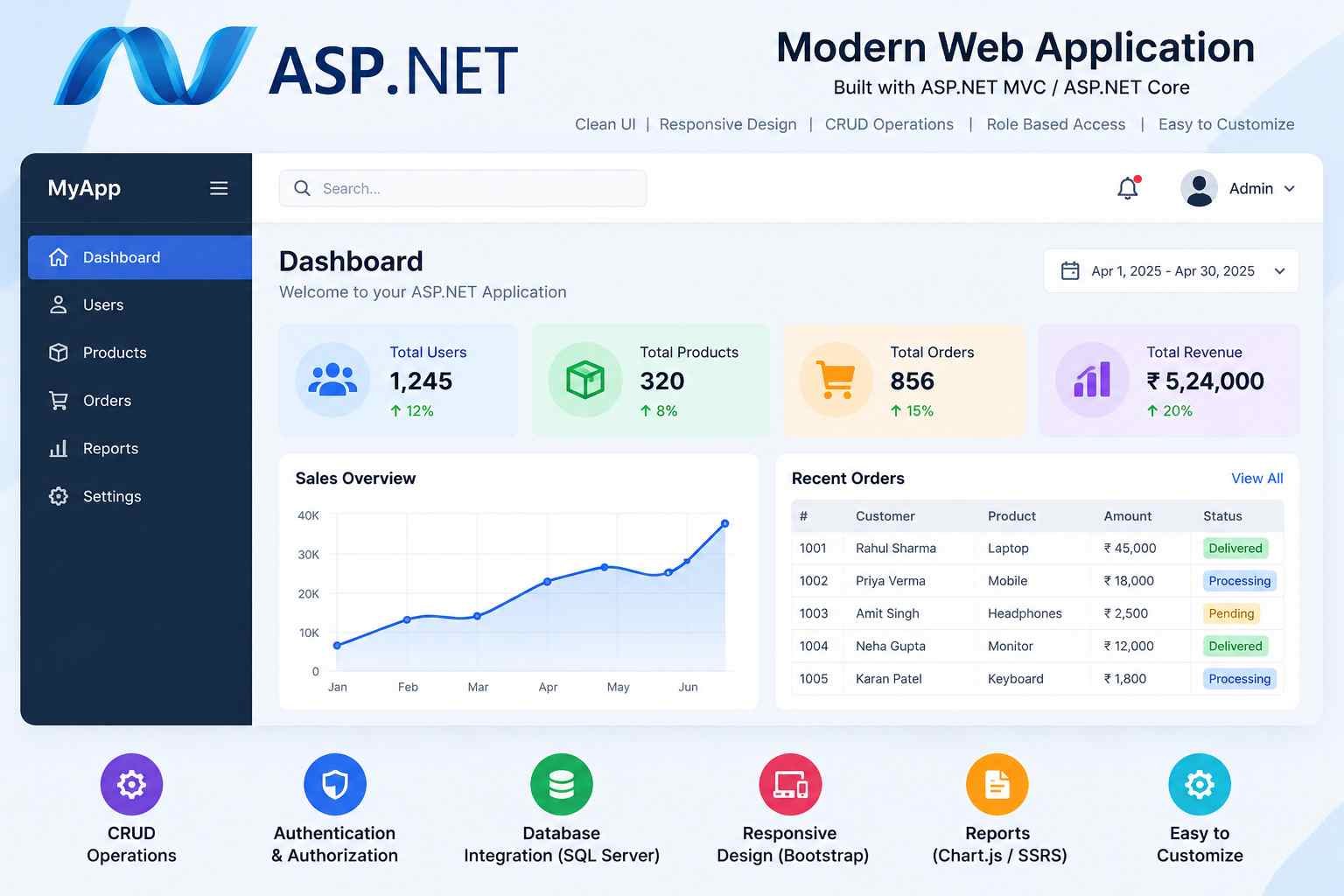
ASP.NET is a web development framework from Microsoft that developers use to build websites, web applications, web APIs, and other internet-based services. It provides tools and libraries for handling browser requests, processing information, connecting to databases, managing user accounts, and returning web pages or data to users.
Imagine a college wants to create an online admission portal. Students should be able to register, fill out application forms, upload documents, check application status, and receive updates. The college also needs a secure administrative panel to manage applications. ASP.NET can provide the server-side technology needed to develop these features.
For beginners, ASP.NET can seem complicated because it involves several related technologies, including C#, .NET, databases, web servers, and application architecture. However, learning it becomes easier when these concepts are studied in the right order.
This guide explains ASP.NET in simple English, covering its meaning, working process, major components, advantages, limitations, practical examples, installation requirements, and career opportunities. It is designed for students, college learners, competitive-exam aspirants, and anyone interested in understanding web development.
See More:-
- MS Word Tutorial
- MS Excel Tutorial
- MS PowerPoint Tutorial
- MS OneNote Turorial
- Common Online Scams & Phishing Attacks: Protect Your Personal & Banking Data
What Is ASP.NET?
ASP.NET is a Microsoft web development framework used to create dynamic websites, web applications, and web services. It enables developers to write server-side code that processes requests, applies business rules, communicates with databases, and generates responses for browsers or other applications.
For example, when a student enters login details on an online examination website, the server must check those details, verify the account, and decide what information the student can access. An ASP.NET application can implement this process by combining application logic, authentication, and database operations.
ASP.NET is part of the broader .NET development ecosystem. Developers commonly use C# to write ASP.NET applications, although other .NET-supported languages can also be used in suitable projects.
Modern ASP.NET Core is open-source and cross-platform. It supports web development on Windows, Linux, and macOS, subject to the requirements of the selected .NET version and deployment environment.
Key facts about ASP.NET
| Feature | Explanation |
|---|---|
| Developed by | Microsoft |
| Main purpose | Building websites, web applications, and APIs |
| Common programming language | C# |
| Platform | Modern ASP.NET Core supports multiple operating systems |
| Runtime ecosystem | .NET |
| Database options | SQL Server, PostgreSQL, MySQL, SQLite, and others through suitable providers |
| Development tools | Visual Studio, Visual Studio Code, and the .NET command-line interface |
| Common architectures | MVC, Razor Pages, Blazor, and Web APIs |
| Application hosting | Cloud platforms, servers, containers, and other supported hosting environments |
| Typical uses | Business portals, educational websites, dashboards, e-commerce applications, and backend services |
These features make ASP.NET a useful choice for applications that require structured code, database integration, security controls, and long-term maintenance.
Why Is ASP.NET Important in Web Development?
A modern website often does much more than display text and images. It may process payments, manage user accounts, store records, send notifications, display personalised information, and communicate with mobile applications.
ASP.NET provides a framework for building the server-side functionality behind these features.
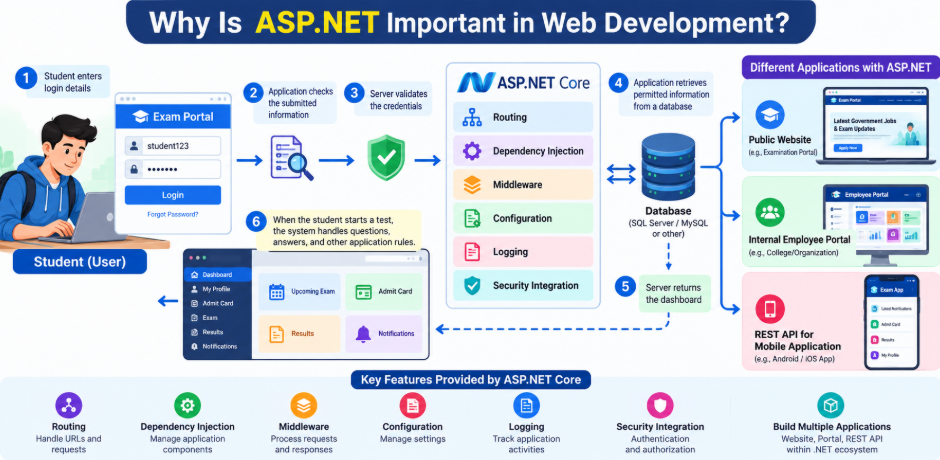
Consider an online examination portal. The homepage may look simple, but several operations can take place when a student uses it:
- The student enters login details.
- The application checks the submitted information.
- The server validates the credentials.
- The application retrieves permitted information from a database.
- The server returns the dashboard.
- When the student starts a test, the system handles questions, answers, and other application rules.
ASP.NET Core includes facilities for routing, dependency injection, configuration, logging, middleware, and security integration that help developers organise this work. These built-in capabilities reduce the need to create every common web application feature from scratch.
ASP.NET is also useful because developers can build different kinds of applications within the same .NET ecosystem. A business might use it for a public website, an internal employee portal, and a REST API that serves a mobile application.
Understanding ASP.NET and .NET
ASP.NET and .NET are related, but they do not mean exactly the same thing.
.NET is the broader development platform. It includes the runtime, libraries, language support, tools, and other components that developers use to create many types of software.
ASP.NET is the web development technology within this ecosystem. It provides the features needed to build applications that communicate over HTTP, serve web pages, and expose web APIs.
C# is a programming language commonly used with .NET and ASP.NET. Developers use C# to express application logic, define data models, validate input, and implement other features.
A simple way to remember the relationship is:
- C#: The programming language used to write the code.
- .NET: The development platform that provides the runtime, tools, and libraries.
- ASP.NET Core: The web framework used to build web applications and services.
For example, a developer might write a C# class that represents a job vacancy, use Entity Framework Core to work with a database, and build an ASP.NET Core API that allows a website to retrieve vacancy information.
Each technology has a different role, but they work together.
ASP.NET vs. ASP.NET Core: What Is the Difference?
ASP.NET is a broad name that includes older web technologies as well as modern ASP.NET Core. Understanding this distinction is important before choosing tutorials, installing tools, or starting a new project.
ASP.NET on the original .NET Framework includes technologies such as Web Forms, ASP.NET MVC 5, and ASP.NET Web API 2. These technologies are associated with the traditional .NET Framework environment, which is primarily Windows-focused.
ASP.NET Core is the modern, open-source web framework designed to run on the current .NET platform. It supports cross-platform development and provides a modular request-processing architecture.
| Feature | Classic ASP.NET on .NET Framework | ASP.NET Core |
|---|---|---|
| Platform | Primarily Windows | Windows, Linux, and macOS |
| Architecture | Depends on the specific legacy technology | Modern, modular web framework |
| Open source | Depends on the component and version | Open-source framework |
| Web Forms | Supported by classic ASP.NET | Not supported as a built-in ASP.NET Core programming model |
| Development direction | Mainly relevant to existing applications and maintenance | Common choice for new .NET web projects |
| Hosting | Commonly associated with IIS and Windows environments | Supports Kestrel, IIS integration, containers, and other hosting options |
| Project structure | Varies by legacy technology | Uses modern .NET project conventions |
The two should not be treated as interchangeable. Code and project structures from classic ASP.NET do not always work directly in ASP.NET Core.
Which should beginners learn? For most new web development projects, learning ASP.NET Core is the practical starting point. Students working with an existing application should first identify whether it uses the classic .NET Framework or modern .NET.
Microsoft maintains documentation for both areas, so always check that a tutorial matches the version of the project you are creating.
How Does ASP.NET Work?
ASP.NET applications commonly operate through a client-server model. The client might be a web browser, a mobile application, or another service. The server receives a request, processes it, and returns an appropriate response.
Suppose a student opens a result page at an examination website. The general process may look like this:
Step 1: The browser sends a request
The student visits a URL such as /results/2026. The browser sends an HTTP request to the server.
Step 2: The web server receives the request
An HTTP server, such as Kestrel, accepts the incoming connection and passes the request into the ASP.NET Core application.
Kestrel is the default cross-platform web server commonly used by ASP.NET Core. Depending on the deployment setup, another server or a reverse proxy may handle some responsibilities before the request reaches the application.
Step 3: Middleware processes the request
Middleware components can perform tasks such as handling errors, redirecting HTTP traffic to HTTPS, identifying the requested route, and applying authentication or authorisation.
The order of middleware matters because each component participates in the request-processing pipeline.
Step 4: Routing selects the endpoint
Routing matches the request URL and HTTP method to an appropriate endpoint.
For example, a request to /results/2026 might match a controller action, a Razor Page, or a Minimal API endpoint, depending on how the application is built.
Step 5: Application logic runs
The selected endpoint processes the request. It may validate parameters, check access permissions, retrieve records, or calculate information.
Step 6: The application returns a response
The server can return HTML, JSON, a file, a redirect, or another appropriate HTTP response. The browser then displays the page or processes the returned information.
Not every application follows precisely the same sequence of operations, but this general model helps beginners understand how server-side web development works.
Main Components of ASP.NET Core
ASP.NET Core includes several important components. Understanding their purposes makes it easier to read existing projects and develop applications of your own.
1. Routing
Routing determines which part of an application should handle an incoming request.
For example:
/jobsmay display a list of vacancies./jobs/125may display information about a particular vacancy./api/jobsmay return vacancy records in JSON format.
Routing connects URLs and HTTP methods to application endpoints. It helps developers organise pages and services in a predictable way.
2. Middleware
Middleware is software that participates in processing HTTP requests and responses.
An application can use middleware to handle exceptions, serve static files, apply security rules, process authentication, or record information about requests.
Think of middleware as a series of checkpoints through which a request passes. Each component performs a defined task and may pass control to the next component.
Developers must configure middleware carefully. Incorrect ordering or missing components can affect security and application behaviour.
3. Dependency injection
Dependency injection is a technique for supplying a class with the services it needs instead of making the class create every dependency itself.
For example, a job application service might need a database context, an email sender, and a logging service. Those dependencies can be registered and supplied by the application’s dependency injection container.
This approach makes applications easier to test, maintain, and organise. ASP.NET Core includes a built-in dependency injection system.
4. Configuration
Applications often need settings such as database connection information, permitted host names, logging preferences, and external service endpoints.
ASP.NET Core supports configuration through sources such as JSON files, environment variables, command-line arguments, and other providers.
A common settings file is appsettings.json. Sensitive production credentials should not be committed to source control in ordinary configuration files. Developers should use suitable secret-management facilities and secure deployment settings.
5. Logging and error handling
Logging helps developers understand what an application is doing and investigate unexpected behaviour.
For example, if a student cannot retrieve an admit card, application logs may help an authorised administrator identify whether the problem involves a database error, a failed external service, or another issue.
Error handling allows applications to respond to failures more consistently. Production applications should avoid displaying detailed internal exception messages or secrets to users.
6. Model binding and validation
Model binding helps ASP.NET Core convert incoming request data into parameters or objects used by application code.
Validation checks whether the supplied data follows defined rules. A student registration form, for example, might require an email address, a name, and a valid date of birth.
Validation should happen on the server even when the browser also checks form inputs. Browser-side validation improves convenience, but it cannot be trusted as the only protection.
7. Dependency on databases and other services
ASP.NET Core can connect with relational databases, non-relational data stores, and external services through appropriate libraries and integrations.
A database may store user accounts, application records, examination details, and transaction histories. A separate email service might send registration confirmations.
ASP.NET Core does not automatically create every part of a database system. Developers must select, configure, and maintain the required data storage and services.
Major Types of ASP.NET Applications
ASP.NET Core supports several ways to organise web applications. The right choice depends on the application’s complexity, user interface, development team’s skills, and maintenance requirements.
1. ASP.NET Core MVC
MVC stands for Model-View-Controller. It separates an application’s responsibilities into three main areas.
- Model: Represents data and application-related rules.
- View: Defines the user interface, commonly using Razor syntax to generate HTML.
- Controller: Processes requests and coordinates the response.
Consider a college course portal. The model represents course information, the view displays the course list, and the controller retrieves the required information and selects the view.
MVC can be useful when a website contains multiple features, several developers work on the same project, or the application benefits from clearly separated responsibilities.
2. Razor Pages
Razor Pages is a page-focused approach to building server-rendered web applications.
Instead of organising every feature around a separate MVC controller, developers can keep page-related logic close to the relevant page. This can make straightforward forms and content-driven interfaces easier to organise.
For example, a scholarship application website may have separate pages for registration, profile management, document submission, and application status.
Razor Pages is a suitable option when the application is primarily organised around individual pages and their related operations.
3. Blazor
Blazor is a web UI framework that allows developers to build interactive interfaces using C# and Razor components.
Traditional web development often uses JavaScript for browser-side interactions. Blazor provides a way to implement many interactive interface behaviours using .NET technologies, although JavaScript integration remains available when required.
Blazor supports different rendering approaches, including server-side and WebAssembly-based execution, depending on the selected hosting and rendering model.
It can be useful for administrative dashboards, interactive forms, and business applications where a reusable component-based interface is helpful.
4. ASP.NET Core Web API
A Web API exposes application functionality through HTTP endpoints. Other applications can send requests to the API and receive structured responses, commonly in JSON format.
Suppose a mobile application needs to display government job notifications. An ASP.NET Core API can return vacancy details, including the job title, organisation, deadline, and eligibility information.
The mobile application can display that information without needing to generate its own copy of the server-side data.
ASP.NET Core supports both controller-based APIs and Minimal APIs. Controllers can offer a familiar organisation for larger applications, while Minimal APIs provide a more direct way to define endpoints.
5. SignalR applications
SignalR helps developers build applications that communicate with connected clients in real time.
Examples include chat applications, live dashboards, collaborative interfaces, and notification systems that need to update users without relying entirely on repeated manual page refreshes.
SignalR abstracts much of the connection management required for real-time communication. The actual transport and hosting behaviour depend on the environment and application configuration.
6. gRPC services
ASP.NET Core can also host gRPC services for communication between applications or services.
gRPC uses defined service contracts and commonly relies on Protocol Buffers for message definitions. It is often considered for service-to-service communication where a strongly defined API contract and efficient communication are useful.
It is not a replacement for every public website or browser-facing REST API. The appropriate technology depends on the clients and communication requirements.
What Programming Language Is Used in ASP.NET?
C# is the most common programming language used in ASP.NET Core development. It is a strongly typed, general-purpose language that supports features such as classes, interfaces, asynchronous programming, and object-oriented design.
A developer can use C# to define a course, validate submitted information, retrieve a database record, or decide which response an API should return.
For example, a simple C# class might represent a job vacancy:
public class Job
{
    public int Id { get; set; }
    public string Title { get; set; } = "";
    public string Organisation { get; set; } = "";
}
This class defines three properties. Id stores a numeric identifier, while Title and Organisation store text values.
The class does not automatically create a database table or a website page. It simply defines a data structure that application code can use. Additional configuration or code is needed to store, retrieve, or display the data.
Should beginners learn C# before ASP.NET?
Learning basic C# first is strongly recommended because ASP.NET Core relies on programming concepts that beginners may not yet know.
Start with variables, data types, conditions, loops, methods, classes, objects, collections, and exception handling. Then move to asynchronous programming, interfaces, and dependency injection as you encounter them in web projects.
Students do not need to master every advanced C# feature before building a small website. Learning basic programming and web concepts together can make the process more practical.
Requirements for Learning ASP.NET
A beginner needs a suitable computer, development tools, and enough programming knowledge to follow examples. The exact requirements depend on the selected .NET version and the size of the application.
Essential tools
| Tool | Purpose |
|---|---|
| .NET SDK | Provides the command-line tools, compiler, and components needed to build .NET applications |
| Visual Studio or Visual Studio Code | Editors used to write and manage application code |
| C# knowledge | Helps you understand the programming logic |
| Web browser | Used to open and test the application |
| Terminal or command prompt | Used to create projects, run commands, and build applications |
| Database system | Needed when the application must persist data |
| Git | Helps track source-code changes and collaborate with others |
You can begin with a basic web application without installing a database server. Add database tools when your project needs to save information between sessions.
Which .NET version should beginners use?
As of October 2026, .NET 10 is a Long Term Support (LTS) release. Microsoft’s published support policy lists November 14, 2028, as its end-of-support date. LTS releases receive a longer support period than Standard Term Support releases. Check the official policy before creating a new production project because release status and servicing details can change.
Official reference: Microsoft .NET support policy.
For learning, use a supported SDK that matches your tutorial and project configuration. Do not install a newer SDK and assume an older tutorial’s every instruction will be identical.
How to Create Your First ASP.NET Core Application

One of the easiest ways to begin is to create a minimal ASP.NET Core application that returns a text response in the browser.
The following example uses the .NET command-line interface. Make sure an appropriate .NET SDK is installed before running the commands.
Step 1: Create a project
Open a terminal or command prompt and run:
dotnet new web -n MyFirstAspNetAppThis command creates a new minimal web application in a project named MyFirstAspNetApp.
Move into the new project directory:
cd MyFirstAspNetAppStep 2: Understand the Program.cs file
Open Program.cs. A template for a minimal web application contains code similar to this:
var builder = WebApplication.CreateBuilder(args);

var app = builder.Build();

app.MapGet("/", () => "Hello from ASP.NET Core!");

app.Run();
The code is short, but each line has a purpose.
WebApplication.CreateBuilder(args) prepares the application builder and loads the standard configuration and services.
builder.Build() creates the web application.
app.MapGet("/", ...) defines an endpoint that responds to an HTTP GET request at the root URL. In this example, it returns a simple text message.
app.Run() starts the application and begins listening for requests according to the configured hosting environment.
Step 3: Run the application
Execute:
dotnet runThe terminal will display the local addresses on which the development server is listening. Open the relevant address in your browser.
The application should show the text:
Hello from ASP.NET Core!The exact local address and port can vary depending on the project’s configuration and development environment.
Step 4: Add another endpoint
You can add a route that returns a different message:
app.MapGet("/about", () => "This is my first web application.");Place this line before app.Run().
When you visit the /about route on the local application, the server returns the new message.
This illustrates an important concept: different URLs can be mapped to different application behaviours.
Step 5: Build a simple JSON endpoint
ASP.NET Core can return structured data as well as text. Add the following endpoint before app.Run():
app.MapGet("/api/courses", () =>
    new[]
    {
        new { Id = 1, Name = "Computer Fundamentals" },
        new { Id = 2, Name = "Web Development" },
        new { Id = 3, Name = "Database Basics" }
    });
When a client requests /api/courses, the endpoint returns a collection of course objects that ASP.NET Core serializes into JSON.
A response would have a structure similar to this:
[
  {
    "id": 1,
    "name": "Computer Fundamentals"
  },
  {
    "id": 2,
    "name": "Web Development"
  },
  {
    "id": 3,
    "name": "Database Basics"
  }
]
This example uses sample data stored directly in the code. A production application would normally retrieve changing course information from a suitable data source and apply appropriate validation and access controls.
For additional practical examples, consult Microsoft’s official ASP.NET Core documentation and Web API tutorial.
How ASP.NET Connects to a Database
Many web applications need to store information permanently. For example, a job portal may need to retain job descriptions, user accounts, saved vacancies, application records, and administrative updates.
ASP.NET Core can communicate with databases through database providers, drivers, and data-access libraries.
Entity Framework Core
Entity Framework Core (EF Core) is an object-relational mapper, commonly called an ORM. It allows developers to work with database records through .NET objects and APIs rather than writing every database operation manually.
Suppose a database contains a Jobs table. A developer can define a Job class, configure an EF Core database context, and use that context to query or update the table.
Conceptually, application code might retrieve a job through a query similar to:
var job = await dbContext.Jobs.FindAsync(id);This example assumes that dbContext has been properly configured and that the application has a suitable Jobs data set. The query itself does not establish the database connection or create the table.
EF Core supports different database providers, and the available features can vary between providers. A project should use a compatible provider and follow its configuration and migration guidance.
What happens when a user submits a form?
Consider a student filling out a registration form:
- The student submits the form through the browser.
- ASP.NET Core receives the request.
- The application validates the submitted data.
- The server checks the rules that must be satisfied.
- The data-access layer saves permitted information to the database.
- The application returns a success message or an appropriate error response.
Developers must also handle failed database operations, duplicate records, invalid submissions, and permissions. A successful database connection by itself does not make an application safe or reliable.
Important Security Features in ASP.NET Core
Security is an essential part of web development. An application that stores personal details, examination records, payment information, or job applications must protect that information against unauthorised access and misuse.
ASP.NET Core provides security-related features and integrates with other tools and libraries. Developers are still responsible for configuring them correctly.
Authentication and authorisation
Authentication establishes a user’s identity. Authorisation determines what that user is allowed to do.
For example, a student may be permitted to view their own examination result, while an authorised administrator may have permission to publish results for multiple students.
A login system should not automatically grant unrestricted access to every page or API endpoint. Sensitive operations need explicit and appropriately designed authorisation rules.
Learn more in Microsoft’s ASP.NET Core authentication documentation and authorisation guidance.
HTTPS
HTTPS protects data in transit between a client and a server. Production applications should use properly configured HTTPS and avoid sending credentials or sensitive data over unencrypted connections.
Input validation
Applications should validate all untrusted input received from forms, URLs, APIs, and other sources. Validation checks can confirm that required fields are present and values fall within acceptable limits.
Validation reduces errors, but it is not a complete substitute for parameterised database operations, output encoding, and other security controls.
Secure configuration
Passwords, API keys, database credentials, and other secrets should not be exposed in public repositories or returned in browser responses.
Developers should use appropriate secret-management systems and restrict access to production settings. Logging should also avoid capturing sensitive information unnecessarily.
Common security mistakes
Avoid relying only on browser-side form validation, assuming hidden buttons prevent access, granting every account administrator permissions, or exposing detailed exception messages in production.
Security requires a combination of safe coding, appropriate configuration, testing, dependency updates, and ongoing maintenance.
Advantages of ASP.NET
ASP.NET Core has several advantages that make it useful for students and professional developers.
1. Cross-platform development
Modern ASP.NET Core applications can run on Windows, Linux, and macOS. This flexibility allows teams to choose a suitable development and hosting environment.
2. Open-source ecosystem
ASP.NET Core is open-source, allowing developers to examine the framework’s source code and contribute through its established development process.
Open source does not mean every related product, third-party service, or tool is free under identical terms. Check the licensing conditions of individual components.
3. Multiple application styles
Developers can build server-rendered websites, interactive interfaces, HTTP APIs, and real-time applications within the .NET web ecosystem.
This variety is useful when a project grows beyond a simple website and begins serving different types of clients.
4. Structured application development
Features such as dependency injection, configuration, routing, and middleware help developers keep application responsibilities organised.
A structured project is generally easier to test and maintain than one in which all database queries, page rendering, and business rules are mixed together.
5. Database integration
ASP.NET Core can work with various database systems through suitable libraries and providers. Developers can select a database based on project requirements, hosting options, existing infrastructure, and team experience.
6. Testing and maintainability
.NET supports testing tools and frameworks that help developers verify application behaviour. Unit tests can examine individual components, while integration tests can examine how different parts work together.
7. Deployment flexibility
Applications can be deployed to cloud platforms, virtual machines, containers, or supported server environments. The exact process depends on the hosting service, operating system, runtime configuration, and application requirements.
8. A useful learning path for backend development
Learning ASP.NET Core also provides experience with HTTP, APIs, databases, authentication, deployment, and software architecture. These skills are valuable when building server-side applications and working in teams.
Limitations and Challenges of ASP.NET
ASP.NET Core is capable, but it is not automatically the best choice for every project.
1. Beginners need to learn several concepts
New developers may need time to understand C#, HTTP requests, routing, middleware, dependency injection, databases, and asynchronous programming.
This learning curve becomes more manageable when students start with small projects instead of attempting to build a complete enterprise application immediately.
2. Setup and configuration require attention
A project may need configuration for its database, environment variables, authentication provider, hosting service, and deployment process. Incorrect settings can cause problems even when the application code appears correct.
3. Architecture can become unnecessarily complicated
Using too many abstractions, services, interfaces, or design patterns in a small application can make it difficult to understand.
A good developer chooses an appropriate level of structure rather than adding layers without a clear reason.
4. Hosting and maintenance still require planning
The framework itself does not guarantee uptime, security, backups, or low hosting costs. Those outcomes depend on application design, hosting resources, monitoring, maintenance, and operational practices.
5. Legacy and modern technologies differ
Students may encounter tutorials for Web Forms or older ASP.NET MVC versions when searching online. Their project templates, syntax, and runtime assumptions can differ substantially from modern ASP.NET Core.
Always confirm the technology and version before following a guide.
ASP.NET vs. PHP, Django, and Node.js
ASP.NET Core is one of several technologies used for backend web development. Each option has a different ecosystem and may suit different teams or projects.
| Technology | Main language or environment | Common use cases | What beginners should know |
|---|---|---|---|
| ASP.NET Core | Commonly C# on .NET | Websites, APIs, business applications, enterprise systems | Learn C# and .NET fundamentals |
| PHP | PHP | Websites, content-management systems, server-side applications | Useful when working with PHP-based platforms |
| Django | Python | Database-driven websites and web applications | Requires Python and familiarity with Django’s conventions |
| Node.js | JavaScript or TypeScript | APIs, real-time applications, and JavaScript-based server development | Allows developers to use JavaScript on the server |
| Laravel | PHP | Structured web applications and APIs | Builds on PHP and provides its own framework conventions |
These technologies can overlap in their capabilities. The comparison should not be reduced to a claim that one is always faster, safer, cheaper, or easier.
For example, a team already experienced in C# may find ASP.NET Core a natural choice for a new business portal. A team with strong Python experience might prefer Django. An existing PHP website may be easier to maintain within its current ecosystem rather than rewrite without a clear business reason.
For students, the most helpful choice is often the framework that aligns with their career goals, available learning resources, project requirements, and current programming skills.
Practical Applications of ASP.NET
ASP.NET Core can support many types of real-world applications.
Educational portals
Schools, colleges, and coaching institutes can use it to build student dashboards, registration forms, attendance systems, learning portals, and examination services.
A portal might allow students to sign in, view their schedule, download permitted documents, and check application status.
Government job and examination websites
Job-notification platforms can use ASP.NET Core to manage recruitment records, examination dates, eligibility criteria, results, admit-card links, and searchable vacancy listings.
An API could provide structured job information to a website or mobile application. An administrative interface could help editors manage updates.
The framework does not verify the accuracy of recruitment information automatically. Editors still need reliable sources, fact-checking procedures, and a process for correcting outdated details.
E-commerce applications
An online store may need product catalogues, user accounts, inventory management, order processing, and payment-provider integration.
ASP.NET Core can implement server-side functionality, but secure payment handling, inventory consistency, privacy, and transaction reliability require careful design.
Business management systems
Companies may develop internal systems for employees, reporting, customer records, document access, and workflow management.
Features such as role-based permissions and audit logging can help organise access to sensitive business information when correctly implemented.
Booking and appointment systems
A booking application may allow users to select available dates, submit requests, and receive confirmations. The application must account for time zones, simultaneous booking attempts, cancellations, and duplicate submissions.
APIs for mobile applications
An ASP.NET Core API can send and receive structured data for Android, iOS, and other clients. The mobile application handles the user interface while the backend implements business rules and data access.
These examples show that ASP.NET Core is not limited to ordinary websites. It can be used as the server-side foundation for a wide range of digital services.
Career Opportunities After Learning ASP.NET
Students who learn ASP.NET Core alongside C# and database fundamentals can prepare for several kinds of software development work. Job titles and responsibilities vary across employers and experience levels.
Common roles include:
- ASP.NET Developer: Develops and maintains applications built with ASP.NET technologies.
- .NET Developer: Works with .NET applications, which may include web, desktop, services, or other software.
- Backend Developer: Builds APIs, business logic, database access, and server-side functionality.
- Full-Stack Developer: Works on both the frontend and backend of an application.
- Software Engineer: Designs, develops, tests, and maintains software systems.
- Web API Developer: Builds services that allow websites, mobile applications, and other systems to communicate.
Learning ASP.NET alone is rarely enough to cover every requirement of these roles. Employers may also expect SQL, Git, testing, debugging, HTML, CSS, JavaScript, API design, cloud fundamentals, and security knowledge.
Skills worth learning alongside ASP.NET
A practical learning plan should include:
- C# programming fundamentals.
- HTML and CSS, followed by basic JavaScript.
- HTTP, URLs, requests, and responses.
- ASP.NET Core routing and application structure.
- SQL and database design.
- Entity Framework Core or another suitable data-access approach.
- Authentication, authorisation, and secure coding.
- Git, automated testing, and debugging.
- Deployment, configuration, and basic monitoring.
Students should also build projects that demonstrate what they can do. A simple job portal, student-management system, library application, or course-registration API can be a useful portfolio project when it includes meaningful functionality and clear documentation.
Salary, hiring demand, and required experience vary by location, company, and market conditions. Check current job listings in your target location rather than relying on a single salary estimate or a claim that one framework guarantees employment.
A Beginner-Friendly ASP.NET Learning Roadmap
A structured learning plan helps you avoid jumping between unrelated tutorials.
Stage 1: Learn basic programming
Start with C# variables, data types, conditions, loops, methods, classes, objects, and collections. Write small programs to practise each concept.
For example, create a program that stores course names and prints them in a list. This builds a foundation for later work with application data.
Stage 2: Understand the web
Learn the purpose of HTML, CSS, URLs, HTTP methods, status codes, and JSON. Understand the difference between a browser request and a server response.
You do not need to become an expert frontend developer before learning backend development, but basic web knowledge will make ASP.NET easier to understand.
Stage 3: Build a minimal web application
Create a simple ASP.NET Core project and add routes that return text and JSON. Practise reading the terminal output, changing endpoints, and troubleshooting errors.
Stage 4: Learn one web application approach
Choose MVC, Razor Pages, Blazor, or Web APIs based on your goals. Learn one approach well before exploring all the others.
For example, choose MVC or Razor Pages for a traditional server-rendered website, or Web APIs when your primary goal is backend development for mobile applications.
Stage 5: Add database functionality
Learn basic SQL, table relationships, primary keys, and queries. Then connect your application to a database using a suitable provider and data-access library.
Create, read, update, and delete records. These common operations are often abbreviated as CRUD.
Stage 6: Add validation and authentication
Build forms with server-side validation. Learn how sign-in works and how access permissions are enforced. Start with established framework features rather than inventing your own password-storage or authentication system.
Stage 7: Test and publish a project
Learn to use debugging tools and automated tests. Publish a small application to a suitable hosting environment, configure its settings, and understand how its logs can help diagnose problems.
Stage 8: Build a portfolio project
Create an application that solves a clear problem. Document its features, configuration, and limitations, and explain the decisions you made.
A finished, understandable project usually demonstrates learning more effectively than a collection of incomplete tutorials.
Common Mistakes Beginners Should Avoid
Several mistakes can make ASP.NET development more difficult than it needs to be.
Learning framework syntax without learning C#: It becomes harder to understand controllers, models, services, and asynchronous code if basic programming concepts are unfamiliar. Strengthen those fundamentals as you progress.
Following outdated tutorials without checking versions: Older projects may depend on .NET Framework or legacy APIs. Confirm that the example matches your selected framework and SDK.
Putting every feature into one file: Small demonstrations can be short, but growing applications benefit from clear separation between endpoints, application logic, data access, and validation.
Trusting only client-side validation: Users can send requests without using the intended browser interface. Validate important data on the server.
Ignoring authorisation: Hiding an administration link does not prevent a user from requesting an administrative endpoint directly. Protect sensitive operations at the server.
Hardcoding production secrets: Credentials stored in public repositories can expose databases and external services. Use secure configuration and secret-management practices.
Copying code without understanding it: Code examples are useful learning tools, but students should be able to explain what each important statement does and how it affects the request.
Skipping testing: An application that works for one sample input may still fail for invalid values, duplicate submissions, missing records, or unauthorised users.
A deliberate approach to these mistakes will help you build applications that are easier to understand, test, and maintain.
Important Points to Remember About ASP.NET
Before moving to advanced topics, keep these facts in mind:
- ASP.NET is Microsoft’s web development technology, while ASP.NET Core is the modern web framework used with current .NET releases.
- C# is the most common language for ASP.NET Core development.
- ASP.NET Core can build websites, web APIs, and real-time applications.
- MVC, Razor Pages, Blazor, and Minimal APIs are different ways to build web experiences or endpoints, not interchangeable names for the same thing.
- Middleware participates in processing HTTP requests and responses.
- Routing maps incoming requests to endpoints.
- Dependency injection helps supply services to the parts of an application that need them.
- Database functionality requires appropriate data-access code and database configuration.
- Authentication identifies a user, while authorisation determines permitted actions.
- Secure deployment, testing, monitoring, and maintenance remain the developer’s responsibility.
- The correct documentation and code examples depend on the framework and .NET version used by the project.
For students preparing for technical interviews or computer-related examinations, these definitions are useful starting points. Practical experience is still necessary to understand how the components work together.
Frequently Asked Questions

1. What is ASP.NET used for?
ASP.NET is used to build dynamic websites, web applications, APIs, and server-side services. Developers can use it for educational portals, business dashboards, online stores, administrative systems, and mobile application backends.
2. Is ASP.NET a programming language?
No. ASP.NET is a web development framework. C# is the programming language most commonly used to develop ASP.NET Core applications, although other supported .NET languages can also be used.
3. Is ASP.NET the same as ASP.NET Core?
No. ASP.NET is a broader term that includes classic ASP.NET technologies and modern ASP.NET Core. ASP.NET Core is the modern, cross-platform framework for building web applications using current .NET releases.
4. Is ASP.NET Core free to use?
ASP.NET Core is open-source and can be used without paying a framework licence fee. However, hosting, databases, development tools, third-party services, and other components may have their own costs or licensing conditions.
5. Is ASP.NET suitable for beginners?
Yes. Beginners can learn ASP.NET Core by starting with basic C#, simple web endpoints, and small projects. Understanding programming fundamentals and HTTP makes the learning process considerably easier.
6. Which programming language should I learn for ASP.NET?
C# is the recommended starting language for most learners. Focus on variables, conditions, loops, methods, classes, collections, exceptions, and asynchronous programming before progressing into more advanced web development topics.
7. Can ASP.NET Core run on Linux?
Yes. ASP.NET Core supports Linux as well as Windows and macOS. Developers must still ensure that the operating system, runtime or deployment configuration, dependencies, and hosting environment are compatible with their chosen application.
8. Can ASP.NET connect to SQL Server and MySQL?
Yes. ASP.NET Core applications can work with SQL Server, MySQL, PostgreSQL, SQLite, and other databases through suitable data providers and libraries. Compatibility and configuration depend on the selected versions and provider.
9. What is the difference between ASP.NET MVC and ASP.NET Web API?
MVC traditionally refers to a Model-View-Controller approach used to organise web application code and often generate HTML pages. A Web API exposes endpoints for other applications to call, commonly returning JSON. Modern ASP.NET Core supports both MVC-style web applications and API development, including Minimal APIs.
10. What is the difference between authentication and authorisation in ASP.NET Core?
Authentication checks a user’s identity. Authorisation determines what that identified user can access or do. For example, logging in may authenticate a student, while an authorisation policy determines whether that student can view a particular result or modify an administrative record.
11. What is Entity Framework Core in ASP.NET development?
Entity Framework Core is an object-relational mapper for .NET applications. It helps developers query and update relational databases through .NET objects and APIs. The database provider, connection configuration, model mapping, and database structure still need to be set up appropriately.
12. Is ASP.NET a good skill for a software development career?
ASP.NET Core can be a useful skill for backend, full-stack, and .NET development roles. Career opportunities depend on practical project experience, C# knowledge, database skills, testing, security awareness, and the requirements of employers in the target market.
Conclusion
ASP.NET is a powerful web development technology for building websites, APIs, and server-side applications. Its modern framework, ASP.NET Core, combines C# and .NET with features such as routing, middleware, dependency injection, configuration, and database integration.
Beginners should first understand the relationship between C#, .NET, and ASP.NET Core. From there, a practical progression through HTTP basics, simple endpoints, one application architecture, database operations, validation, security, and deployment will provide a solid foundation.
Learning every framework feature at once is unnecessary. Start with a small application, understand how each request is handled, and gradually add features that solve real problems. With consistent practice and well-chosen projects, ASP.NET can become a useful part of your web development skill set.
2 thoughts on “ASP.NET Explained: A Complete Beginner’s Guide to Web Development”