
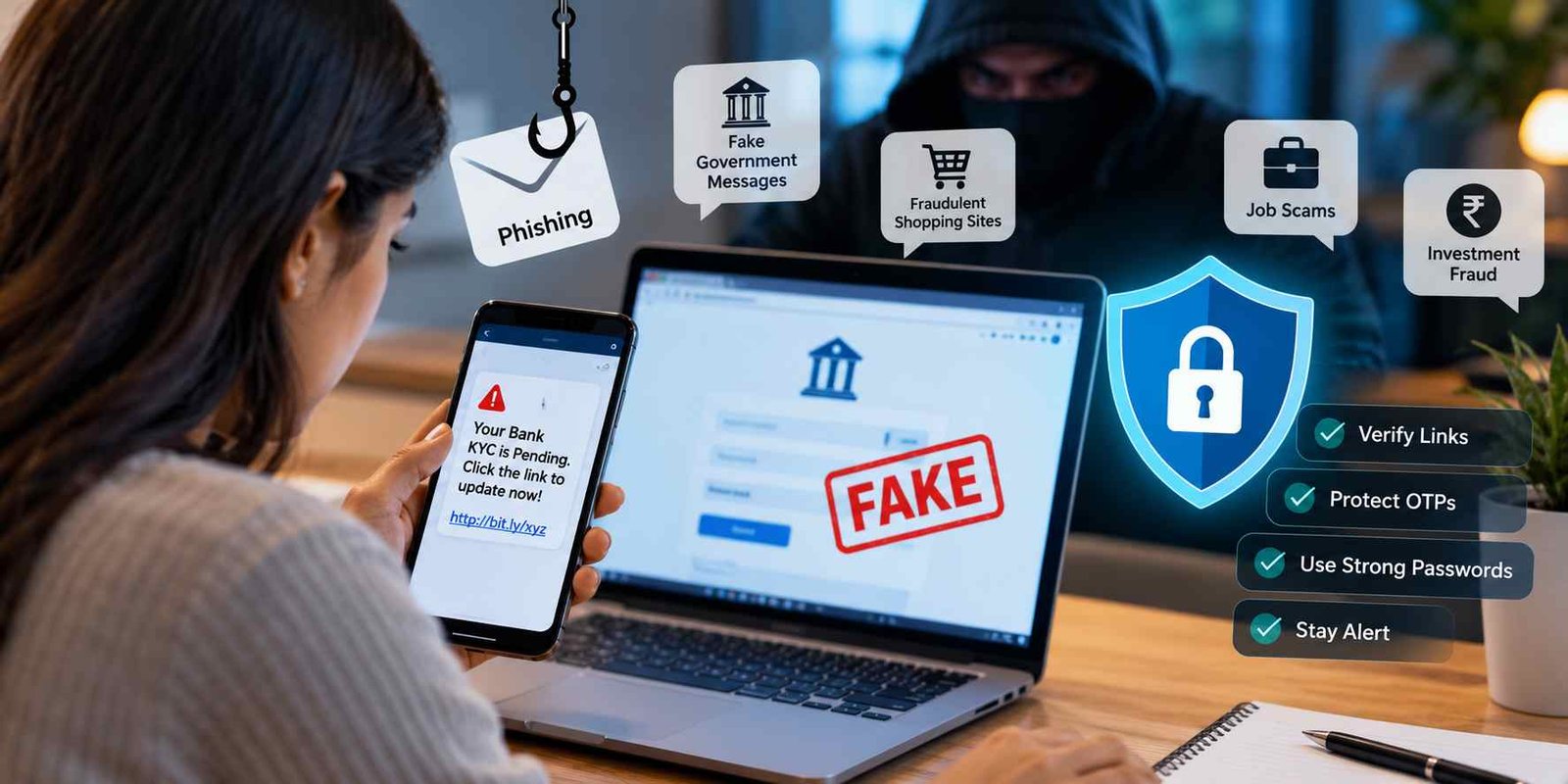
The internet has made studying, shopping, banking, applying for government jobs, and communicating with others much easier. With a smartphone and an internet connection, students can fill out examination forms, pay application fees, receive money through UPI, and access important services from almost anywhere. However, the same convenience also creates opportunities for online scammers to steal personal information and money.
Online scams do not always involve complicated hacking techniques. Sometimes, a criminal needs only one fake message, a convincing phone call, or a misleading website to trick someone into sharing an OTP, entering a banking password, or approving an unwanted payment. Even people who regularly use digital services can be deceived when a message looks genuine or creates a sense of urgency.
For students, competitive-exam aspirants, job seekers, parents, and working professionals, understanding common online scams and phishing attacks is an essential part of digital safety. Fraudsters may impersonate banks, government departments, recruitment agencies, courier companies, customer-care representatives, or even people you know.
The good news is that many scams become easier to recognise when you understand how they work. By learning simple verification techniques, protecting your passwords, and knowing where to report suspicious activity, you can take practical steps to Protect Your Personal & Banking Data.
This guide explains the most common online scams, how phishing attacks operate, how to recognise suspicious messages and websites, how to secure banking information, and what to do if you accidentally click a fraudulent link or lose money online. The examples are designed to help beginners understand digital security without needing advanced technical knowledge.
See More:-
- MS Word Tutorial
- MS Excel Tutorial
- MS PowerPoint Tutorial
- MS OneNote Turorial
- How to Use Mail Merge in MS Word with Excel Data
What Are Online Scams and Phishing Attacks?
Online scams are deceptive activities carried out through the internet, mobile applications, phone calls, emails, text messages, or social media to steal money, personal information, account access, or other valuable information.
Phishing is a specific type of online deception in which criminals pretend to represent a trusted organisation or person to persuade someone to reveal confidential information, visit a fraudulent website, download a harmful file, or approve an unsafe action.
For example, you might receive a text message claiming that your bank account will be blocked unless you update your KYC details immediately. The message contains a link to a website that resembles your bank’s official website. When you enter your login details, the criminal may capture them and attempt to access your account.
The website may look professional, but its purpose is to collect your information rather than provide a genuine banking service.
The Indian Computer Emergency Response Team (CERT-In) explains this general process in its Digital Safety Compass Handbook, which covers fake websites, suspicious links, and the theft of sensitive information.
Difference Between an Online Scam and a Phishing Attack
Although the terms are related, they do not mean exactly the same thing.
| Feature | Online Scam | Phishing Attack |
|---|---|---|
| Meaning | A broad form of online deception | A specific deceptive technique |
| Main objective | To steal money, information, access, or valuable assets | To obtain information or access through impersonation |
| Common methods | Fake investments, job scams, shopping fraud, romance scams | Fraudulent emails, messages, websites, or login pages |
| Example | Paying a fake recruiter for a job | Entering your bank password on a fake bank website |
| Prevention | Verify people, offers, websites, and transactions | Check links, verify the sender, and protect credentials |
A phishing attack may be part of a larger scam. For instance, a criminal may send a phishing email to steal someone’s email password and then use the compromised account to request money from the victim’s contacts.
Understanding the difference helps you recognise that scammers can use several techniques during a single fraudulent activity.
Why Is It Important to Protect Your Personal & Banking Data?
Personal and banking information can be valuable to criminals because it may help them access accounts, impersonate you, conduct unauthorised transactions, or target you with more convincing scams.
Personal information includes your full name, date of birth, phone number, email address, home address, identification documents, and other details that can help identify you.
Banking information includes your account details, debit or credit card information, internet banking credentials, UPI PIN, passwords, and transaction-related information. Some information is intended to be shared for legitimate purposes, but confidential authentication details must remain private.
Consider a student who uses the same password for email, social media, and a shopping website. If criminals steal that password from one compromised service, they may try using it on other accounts. This technique is known as credential stuffing.
Similarly, a job seeker who shares identity documents with a fraudulent recruitment agency may later receive convincing messages containing their name, phone number, or application details. The extra familiarity can make subsequent scams appear genuine.
Protecting your information can help you:
- Reduce the risk of unauthorised access to online accounts.
- Prevent avoidable financial losses.
- Keep identity documents from being misused.
- Protect examination, employment, and educational records.
- Reduce the chances of account impersonation.
- Maintain greater control over your digital identity.
No security measure can eliminate every risk. However, careful verification, unique passwords, updated software, and responsible payment practices can make it considerably harder for criminals to deceive you.
Common Types of Online Scams You Should Know About
Online fraud takes many forms. Some scams depend on fear, while others promise attractive rewards, employment opportunities, refunds, or financial returns.
Learning to recognise common methods can help you pause before taking an unsafe action.
1. Phishing Emails
Phishing emails are messages designed to appear as though they came from a legitimate organisation. The sender may pretend to represent a bank, university, government department, recruitment platform, online store, or email service.
The email may include a warning such as:
- Your account will be suspended today.
- Your bank details require immediate verification.
- Your examination application is incomplete.
- Your email password has expired.
- A payment has failed and must be confirmed.
- You have received a refund that requires verification.
The email usually encourages you to click a link, download an attachment, or provide personal information.
For example, a college student might receive an email claiming that their university account will be deactivated unless they confirm their password. A linked webpage may imitate the university’s login page and collect the password entered by the student.
How to stay safe: Check the complete sender address, avoid unexpected attachments, and verify urgent requests through the institution’s official website or contact details. Do not rely on a familiar display name alone.
2. Smishing: Fraudulent SMS and Text Messages
Smishing refers to phishing conducted through SMS or similar text messages.
These messages are often short and designed to provoke an immediate response. They may claim that a parcel cannot be delivered, a bank account needs attention, an electricity bill is overdue, or a government benefit is waiting to be released.
For example:
“Your electricity connection will be disconnected tonight. Pay the outstanding bill through this link.”
A recipient may panic and open the link without checking whether the message is genuine.
Some messages include shortened URLs or unfamiliar website addresses. Others may ask the recipient to call a particular number.
How to stay safe: Do not open unexpected payment or verification links. Visit the relevant service’s official website independently, check the actual bill or account status, and use verified contact details.
A message does not become trustworthy simply because it arrives on your registered mobile number.
3. Vishing: Fraudulent Phone Calls
Vishing means voice phishing. Criminals use telephone calls or internet-based voice calls to deceive people into revealing sensitive information or authorising payments.
A caller might claim to be a bank employee, government official, insurance agent, police officer, customer-care representative, or technical-support professional.
They may use fear to create pressure:
“Someone is trying to withdraw money from your account. Tell me the OTP so I can stop the transaction.”
Another caller might promise to increase a credit limit or release a refund if you confirm your card details.
A caller may even know your name or certain personal details. This does not prove that the person is genuine.
The Reserve Bank of India has warned about fraudulent communications in which impostors use threats, fictitious offers, and false identities to obtain sensitive information. See the RBI’s advisory on fraudulent activities in its name.
How to stay safe: End the call and contact your bank or the relevant organisation using a verified number obtained independently. Never disclose your password, OTP, UPI PIN, or card PIN to a caller.
4. UPI Payment Scams
Unified Payments Interface (UPI) allows people to transfer money between supported bank accounts using digital payment applications. Its convenience also makes it a target for social-engineering scams.
Criminals may pretend to be buyers, sellers, customers, delivery agents, or customer-care employees. They might send fake payment screenshots or request that you approve a payment under a misleading explanation.
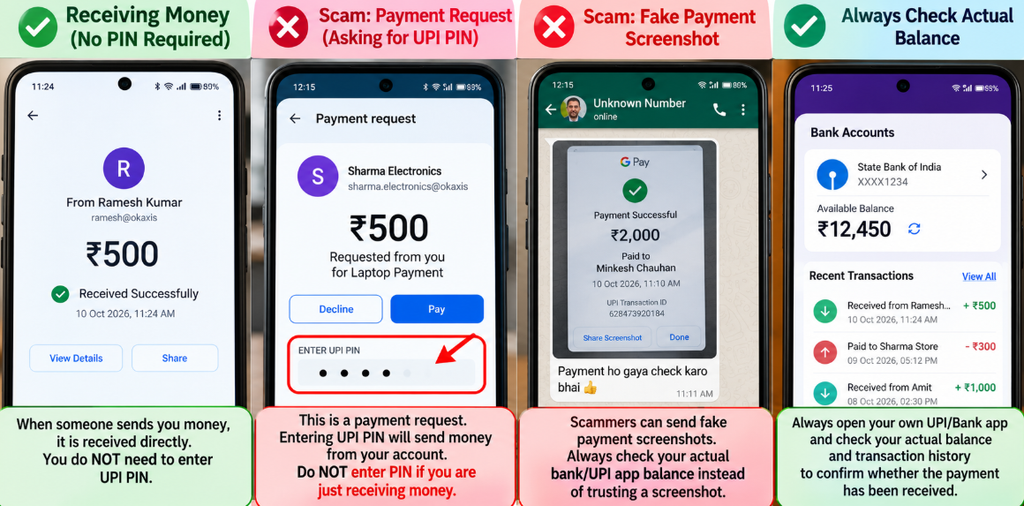
One common trick involves a person who claims to be sending you money but asks you to enter your UPI PIN to receive it.
This is a major warning sign. You do not need to enter your UPI PIN simply to receive an ordinary UPI payment. Entering the PIN authorises an action specified by the payment application, so always read the screen before proceeding.
The National Payments Corporation of India (NPCI) specifically warns users about fake cashback links and fraudulent QR-code requests. Scanning a QR code and entering a UPI PIN are intended for payment-related actions, not for receiving money from an ordinary sender. Read the NPCI fraud-awareness guidance.
How to stay safe:
- Read the transaction screen before entering your PIN.
- Never approve a collect request just because someone tells you that it will release a reward.
- Check your actual bank or payment-app balance instead of trusting a screenshot.
- Do not install applications suggested by unknown callers.
- Decline payment requests you do not recognise.
5. Fake Job and Recruitment Scams
Fake recruitment scams are particularly relevant to students, fresh graduates, and government-job aspirants.
Fraudsters create misleading job advertisements or impersonate employers, recruitment agencies, or public-sector organisations. They may promise guaranteed selection, work-from-home employment, an interview without qualifications, or a government job in exchange for money.
Some scammers create professional-looking websites and send fake offer letters containing logos, reference numbers, signatures, or fabricated employee details.
For example, a job seeker might receive a message claiming that they have been selected for a railway or banking position. The sender then demands payment for a document-verification certificate, security deposit, or appointment confirmation.
A convincing offer letter is not proof of genuine recruitment.
How to stay safe:
- Find the recruitment notice on the official employer or recruiting authority’s website.
- Check the advertisement number, eligibility conditions, application dates, and selection process.
- Verify the sender’s email address and the domain of the website.
- Do not pay an unauthorised person for guaranteed selection.
- Compare the offer with the employer’s published recruitment process.
For government examinations, use the official notification to verify application fees and payment instructions. Do not assume that a message is genuine because it mentions a real examination name.
6. Fake Websites and Login Pages
Fraudulent websites imitate genuine websites to persuade users to enter credentials, make payments, or upload personal documents.
These pages may copy a company’s colours, logo, navigation, and form layout. Some use web addresses that resemble the legitimate address but contain extra words, misspellings, or unfamiliar domain endings.
For example, a fake banking domain might include the bank’s name followed by unrelated words. A user who reads only the beginning of the address may overlook the difference.
A padlock icon or HTTPS connection is not proof that a website is legitimate. It indicates an encrypted connection, not that the site belongs to a trustworthy organisation.
How to stay safe: Type the known address yourself, use an official app, or open the service through a verified bookmark. Inspect the complete domain before submitting information.
If the website requests unnecessary personal details, payment information, or an unexpected download, stop and investigate.
7. Fake Customer-Care Scams
In customer-care scams, fraudsters impersonate support staff and offer to resolve a banking problem, refund request, online shopping complaint, or payment failure.
A person might search for a company’s customer-care number and unknowingly choose a fraudulent listing. The person answering then asks them to install remote-access software, disclose an OTP, or complete a payment to process a refund.
Another common method involves posting fake support numbers in comments or replies on social media.
How to stay safe: Obtain support details from the company’s official website or app. Avoid numbers shared by unknown people. Never allow an unverified person to control your phone or computer remotely, particularly while banking applications are accessible.
8. Fake Cashback, Lottery, and Reward Scams
These scams promise prizes, cash rewards, shopping vouchers, lottery winnings, or benefits that the recipient has not legitimately earned.
A message might claim that you have won a large prize, received unexpected cashback, or been selected for a government financial benefit. To receive it, you must pay a processing fee, provide bank details, or open a link.
The supposed reward creates excitement, making people less likely to question the sender.
The RBI has highlighted fraudulent schemes that use fictitious lottery winnings, money transfers, and supposed official offers to extract fees from victims.
How to stay safe: Verify the promotion through the organisation’s official channels. Be suspicious of unexpected winnings that require advance payments or confidential banking information.
Do not pay a stranger merely because they claim that a reward is waiting for you.
9. Fake Loan and Credit-Card Offers
Fraudulent loan offers often target students, people seeking emergency funds, and individuals with limited access to conventional credit.
A scammer may advertise instant loans with no checks, guaranteed approval, extremely easy eligibility, or unusually attractive terms.
After collecting personal documents, the scammer may demand advance processing charges or ask the applicant to install an unauthorised loan application.
Some fraudulent applications may request unnecessary device permissions or misuse personal information.
How to stay safe: Check the lender’s identity and regulatory status where applicable. Read the complete terms, interest rate, fees, and privacy information. Verify the lending arrangement through official channels rather than relying on an advertisement or caller’s claim.
Do not transfer advance fees to unknown individuals based on promises of guaranteed approval.
10. Fake Investment and Trading Scams
Investment fraud involves misleading people into sending money to schemes that promise unrealistic returns or falsely present themselves as legitimate financial opportunities.
These scams may appear on social media, messaging groups, websites, and video platforms. Some use fake testimonials, fabricated profit screenshots, or impersonations of financial experts.
A group may show apparent profits initially to build confidence, then encourage the victim to deposit larger amounts. When the victim attempts to withdraw money, the operators may demand additional taxes, unlocking fees, or verification payments.
How to stay safe: Research the organisation, verify relevant registrations, understand the risk, and avoid investment decisions based on pressure or guaranteed-return claims. Never rely only on screenshots or testimonials supplied by the promoter.
Before investing, independently verify the provider and consult official regulatory resources where relevant.
11. QR-Code Scams
QR codes make it easy to open websites, obtain contact information, and initiate digital transactions. However, a QR code can also direct you to a fraudulent website or payment request.
A criminal may tell a buyer that scanning a code is necessary to receive a refund or collect payment. The buyer may unknowingly approve a transaction instead.
The important point is that the action depends on what the QR code opens and what the payment application subsequently asks you to approve.
How to stay safe: Scan only codes you trust, inspect the payment recipient and amount, and reject any transaction that does not match your intention.
If you are receiving money, check the actual credited amount in your account rather than entering a PIN because someone has instructed you to do so.
12. SIM-Swap and Mobile-Number Fraud
SIM-swap fraud involves criminals attempting to gain control of a victim’s mobile number through fraudulent replacement-SIM or account-related procedures.
If successful, they may receive certain messages or verification codes intended for that number, potentially helping them target linked accounts.
Unexpected loss of mobile network service, unexplained SIM-related notifications, or alerts about account changes can be warning signs, although network outages can also have ordinary causes.
How to stay safe: Contact your mobile operator through official channels if your SIM stops working unexpectedly or you receive an unfamiliar SIM-replacement alert. Protect your email account, mobile-provider account, and banking credentials, and enable available account-security measures.
Do not disclose verification codes to someone claiming to be a network representative.
13. Remote-Access App Scams
Remote-access applications can be useful for legitimate technical support. However, criminals may persuade victims to install them so that they can view or control parts of a device.
A fake support representative may claim that the application is necessary to reverse a payment, verify a bank account, or receive a refund.
Giving an unknown person remote access while a banking app is open can expose the victim to significant risk.
How to stay safe: Install applications only when you understand why they are needed and trust the provider. Never follow remote-access instructions from an unsolicited caller. If you suspect that someone has gained access to your device, disconnect it from the internet if appropriate and use a separate trusted device to secure important accounts.
14. Social Media Impersonation Scams
Scammers may create fake profiles using another person’s name, photograph, or publicly available information.
They might impersonate a friend asking for urgent financial help, a recruiter offering employment, a celebrity promoting a reward, or a support employee offering assistance.
The request may arrive through a hacked account belonging to someone you actually know.
How to stay safe: Verify unusual requests through another trusted communication channel. Do not transfer money simply because the request appears to come from a familiar profile. Review privacy settings and enable two-factor authentication wherever available.
15. QR, Delivery, and Refund Scams
Fake parcel messages and refund requests are common examples of scams built around everyday activities.
A message may claim that your delivery address is incorrect or that a small charge must be paid before a parcel can be released. Another may say that a refund is pending and ask you to enter banking details.
If you are expecting a parcel, the message may appear especially believable.
How to stay safe: Open the seller’s or courier company’s official app, enter the tracking number there, and verify whether any action is actually required. Do not pay an unfamiliar person or use an unexpected link simply because the message refers to a delivery.
How Do Phishing Attacks Work Step by Step?
Phishing attacks usually rely on deception rather than technical knowledge on the victim’s part. The criminal creates a situation in which sharing information or taking an unsafe action appears reasonable.
A typical phishing attack follows these steps:
Step 1: The criminal selects a target.
The target may be chosen randomly or because the criminal knows something about their bank, university, workplace, shopping habits, or recent activities.
Step 2: A convincing message is prepared.
The criminal creates an email, SMS, social media message, or phone script that resembles communication from a trusted organisation.
Step 3: The message creates pressure or interest.
The message may mention an urgent account problem, a pending refund, an examination update, a reward, or an unusual login.
Step 4: The victim is asked to act.
The request may involve clicking a link, opening an attachment, sharing a password, installing an application, or approving a payment.
Step 5: The criminal attempts to misuse the information or access.
Depending on the scam, the criminal may use stolen credentials, initiate unauthorised transactions, impersonate the victim, or target additional accounts.
Step 6: Further deception may follow.
The victim may receive additional messages or calls claiming to offer account recovery, refunds, or assistance. These contacts may be part of the same fraud or a separate recovery scam.
Recognising this pattern allows you to interrupt the process. You do not have to determine exactly who sent a suspicious message before deciding not to follow its instructions.
Warning Signs That an Online Message May Be a Scam
Not every badly written email is fraudulent, and some scams are professionally prepared. It is therefore better to consider several warning signs together instead of relying on a single clue.
| Warning sign | Why it deserves attention | Safer response |
|---|---|---|
| Urgent threats | Pressure can prevent careful checking | Verify the claim independently |
| Unexpected reward | The offer may be designed to provoke excitement | Check the official promotion details |
| Request for OTP or PIN | Confidential authentication information may be at risk | Refuse and contact the institution independently |
| Unknown payment request | It may initiate an unauthorised transfer | Check the recipient and purpose |
| Strange website address | The domain may imitate a legitimate service | Open the known official address |
| Unexpected attachment | The file may contain harmful content | Confirm the sender and purpose |
| Request to install an app | The app may expose device information or control | Verify the provider and necessity |
| Secrecy or intimidation | The caller may be trying to isolate you from advice | Stop and discuss the request with a trusted person |
Other warning signs include unusual sender addresses, mismatched links, unexplained requests for identity documents, and messages that demand immediate payment outside an established process.
Remember that scammers can use correct spelling, professional logos, and detailed personal information. A polished appearance does not establish authenticity.
Practical Ways to Protect Your Personal & Banking Data
Digital safety becomes more effective when it is built into everyday habits. You do not need to be a cybersecurity expert to make sensible security decisions.
Use Strong and Unique Passwords
A strong password should be difficult to guess and should not be reused across important accounts.
For example, using the same password for email, social media, and internet banking creates a single point of failure. If one service is compromised, attackers may test the stolen password against other accounts.
Follow these practices:
- Use a different password for each important account.
- Choose long, difficult-to-guess passwords or passphrases.
- Avoid predictable information such as your name, birth date, or mobile number.
- Consider a reputable password manager to create and store unique passwords.
- Change a password promptly if you believe it has been exposed.
Your primary email account deserves particular attention because it may be used to reset passwords on other services.
Never Share Your OTP, PIN, or Banking Password
An OTP is a one-time password used to verify certain activities. A PIN is a personal identification number that can authorise particular actions, depending on the system.
Treat these details as confidential.
Never share your UPI PIN, ATM PIN, internet banking password, or OTP with an unknown caller or through an unverified website. Do not disclose them merely because someone claims to be a bank employee or government official.
The RBI’s digital banking safeguards specifically advise users not to share passwords, PINs, OTPs, CVVs, or UPI PINs.
If you receive an OTP that you did not request, do not share it. Check whether an account action may have been initiated, and contact the relevant organisation if necessary.
Verify Websites Before Entering Information
Before entering banking details or personal information, inspect the website address carefully.
Look for the correct domain rather than checking only whether the page contains a familiar logo. Watch for added words, unusual spellings, misleading subdomains, and links that redirect somewhere unexpected.
For example, in a web address, the actual domain matters more than the appearance of the text displayed in an email.
The presence of HTTPS is helpful for connection security, but it does not prove that the organisation operating the website is genuine.
The safest approach is to type the official address yourself, use a trusted bookmark, or access the service through its verified application.
Keep Your Mobile Phone and Computer Updated
Software updates frequently include security fixes. Delaying updates may leave known vulnerabilities unpatched.
Update your operating system, browser, banking applications, and other commonly used software. Download applications from trusted official stores and review their permissions.
Avoid unofficial application packages and unknown software claiming to improve banking security or recover money.
You should also remove applications that you no longer use, especially those with unnecessary access to sensitive information.
Enable Two-Factor Authentication
Two-factor authentication adds another verification step to the login process. Depending on the service, this may involve an authenticator application, a security key, a verification code, or another supported method.
It can reduce the risk of account takeover when a password is stolen, although no single method guarantees complete protection.
Enable the strongest practical authentication options offered by your email, social media, and other important accounts. Secure the recovery methods as well, because a weak recovery process may undermine the main login protection.
Avoid Banking on Public or Untrusted Devices
Public computers and shared devices can expose users to risks such as saved passwords, unauthorised software, and unattended sessions.
Whenever possible, use your own trusted device for banking and account management. Avoid saving login details on shared computers, and always sign out when finishing a session.
Public Wi-Fi also deserves caution, especially if you cannot verify the network. Prefer a trusted connection for sensitive activities, and use official applications or websites.
The RBI’s financial awareness guidance discusses the risks associated with suspicious links, untrusted portals, unauthorised applications, and the sharing of confidential payment information.
Monitor Your Bank Transactions
Review bank notifications, transaction histories, and card activity regularly. Turn on available SMS or email alerts to receive notifications about relevant account activity.
If you notice an unfamiliar debit, suspicious login, or unexpected verification message, investigate immediately.
Do not assume a small transaction is harmless. Check with your bank if it appears unauthorised, and ask about the appropriate steps to secure your account.
Limit What You Share Online
Publicly sharing your phone number, date of birth, travel plans, identity documents, or other personal details can make it easier for criminals to design targeted messages.
Review social media privacy settings and avoid uploading sensitive documents to public pages.
When an institution legitimately requests documents, check how they will be collected and whether the organisation is genuine. Share only the information that is necessary for the legitimate purpose.
Back Up Important Files
Keep backup copies of important documents, educational work, and other valuable files. Use a trusted backup method and make sure you can restore the files when necessary.
Backups can help protect against data loss caused by device failure, accidental deletion, or certain forms of malicious software.
A backup should not simply be another always-connected copy that a compromised device can erase. Choose a method appropriate to your needs and security risks.
How to Stay Safe While Using UPI and Internet Banking
Digital payments are useful for paying fees, shopping, splitting bills, and transferring money to family members. Safe use depends on understanding what the payment screen is asking you to do.
Check the Recipient Before Authorising a Transaction
Before confirming a transfer, inspect the recipient’s name, payment address, and amount. Stop if anything differs from the details you expected.
Never authorise a transaction simply because another person tells you to approve it quickly.
If someone sends a payment request unexpectedly, confirm the reason through a trusted channel.
Understand What Your UPI PIN Does
Your UPI PIN is used to authorise certain actions in a UPI application. It is not a general-purpose code for confirming your identity to strangers.
The NPCI UPI FAQs explain that users should not share their UPI PIN and that it is required to authorise relevant transactions.
Read the payment application’s displayed instructions before entering it. If the screen indicates that money will be sent, blocked, or otherwise affected, do not proceed unless that is what you intend.
Do Not Trust Payment Screenshots Alone
A screenshot can be fabricated, altered, or taken from an unrelated transaction.
If a customer claims to have paid you, verify the actual credit through your bank account or trusted payment application. Do not hand over goods or provide a service solely because someone shows you an image of a successful payment.
Use Official Banking Channels
Access your bank through its official application, verified website, branch, or published support contacts.
Do not follow a caller’s instructions to install an unknown app or reveal confidential information in the name of resolving a transaction.
If you are unsure whether a request is legitimate, stop the process and contact your bank independently.
What Should You Do If You Click a Phishing Link?
Clicking a suspicious link does not automatically mean that your account has been compromised. The level of risk depends on what happened next.
If you opened the link but did not enter information, approve a transaction, download a file, or grant permissions, the risk may be lower. However, you should still close the page, avoid further interaction, and pay attention to warning signs.
Take the following steps:
- Close the suspicious webpage. Do not complete forms, download files, or approve prompts.
- Avoid entering personal information. If you have not submitted any details, do not provide them.
- Check for downloads or permissions. If you downloaded a file or installed an application, investigate it before using your device for sensitive tasks.
- Change exposed passwords. Use the legitimate service from a trusted device, especially if you entered your login details.
- Review account activity. Check for unexpected logins, password-reset emails, transactions, or changes to recovery settings.
- Contact your bank if financial details were exposed. Follow the bank’s instructions for securing accounts, cards, or digital payment access.
- Report suspicious activity. Preserve the message, website address, transaction reference, and other evidence when safe to do so.
If you granted an unknown person remote access, treat the situation more seriously. Disconnect the affected device from the network if appropriate, use a trusted separate device to secure important accounts, and seek reliable technical assistance if necessary.
Do not continue communicating with the suspicious person to ask whether your information is safe.
What Should You Do If Money Is Lost in an Online Scam?
If money has been transferred without your authorisation or you have been deceived into making a payment, report the incident immediately.
In India, the national cybercrime helpline for reporting financial cyber fraud is 1930. The National Cyber Crime Reporting Portal provides an online route for reporting cybercrime.
Take these steps as soon as possible:
Step 1: Contact the cybercrime helpline. Call 1930 promptly if you have experienced financial cyber fraud. Provide accurate information about the incident.
Step 2: Notify your bank or payment provider. Use the official contact details in your banking application, on your bank’s verified website, or on your card. Report the unauthorised transaction and ask what immediate protective measures are available.
Step 3: Record the transaction details. Keep the transaction ID, date, amount, relevant account or payment identifiers, and any available screenshots or messages.
Step 4: Complete the online complaint process. Follow the instructions provided through the official portal or helpline. Keep the acknowledgement or complaint number for future reference.
Step 5: Secure your accounts. Change exposed passwords, block affected cards where necessary, and review other accounts that may use the same credentials.
Step 6: Preserve evidence. Save genuine messages, suspicious URLs, call details, payment records, and relevant correspondence. Do not alter or delete evidence unnecessarily.
The official cybercrime portal advises victims to report incidents and provides a process for complaints to be handled by the appropriate law-enforcement agencies. Prompt reporting can assist with investigation and possible intervention, but it does not guarantee that money will be recovered.
Never pay someone who unexpectedly promises guaranteed recovery of stolen money. Recovery scammers may target victims by pretending to be investigators, lawyers, bank officials, or cybersecurity experts.
How Students and Job Seekers Can Avoid Online Scams
Students and recruitment aspirants often interact with unfamiliar websites, online payment gateways, educational platforms, and recruitment advertisements. A few simple habits can help reduce the risk of fraud.
Verify Examination and Recruitment Notifications
When you receive an examination update, result message, admit-card link, or recruitment notification, check the official website of the relevant examination authority or recruiting organisation.
Do not assume that a message is authentic simply because it contains the name of a familiar examination.
Before making a payment, check the official advertisement, application deadline, fee amount, and accepted payment methods. Be cautious if someone asks you to send money to a personal UPI ID or bank account to secure a government job.
Protect Your Educational Accounts
Use unique passwords for your email, student portal, learning-management system, and other educational accounts.
Avoid sharing account credentials with unknown people who claim they can improve marks, arrange certificates, change results, or provide privileged access to an examination system.
If you need help, use official support channels and preserve the confidentiality of your login details.
Be Careful With Work-From-Home Offers
Some fake employment advertisements promise high earnings for simple tasks, data entry, reviewing products, or liking online content.
The initial task may appear genuine. Later, the organiser may demand a deposit, recharge, registration fee, or additional payment before releasing supposed earnings.
Check the employer’s identity, published terms, and payment arrangement. Do not transfer money to unlock earnings displayed in an unfamiliar app or website.
Discuss Suspicious Requests With Someone You Trust
Scammers often try to prevent victims from seeking a second opinion by creating urgency or demanding secrecy.
If a message creates panic, involves a large payment, or seems unusually generous, pause and discuss it with a trusted person. This is particularly useful for younger students and people unfamiliar with digital payments.
Taking a few minutes to verify a claim is better than making a decision under pressure.
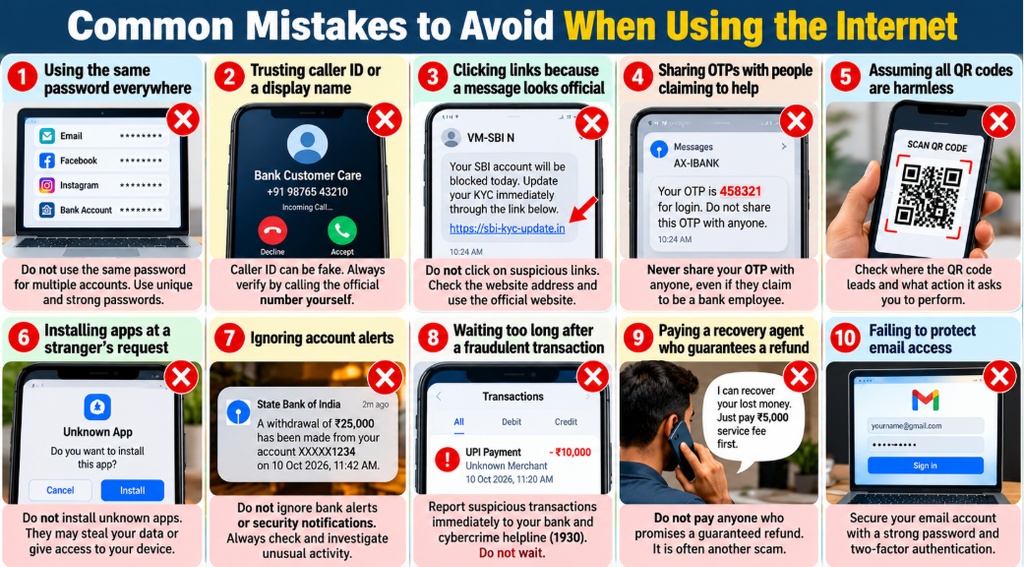
Common Mistakes to Avoid When Using the Internet
Even cautious internet users sometimes develop habits that increase their exposure to scams. Avoid these common mistakes.
Using the same password everywhere: Reusing passwords allows one compromised account to put other accounts at risk. Use unique credentials for important services.
Trusting caller ID or a display name: Names and numbers shown on a device do not establish that a caller is genuine. Verify sensitive requests independently.
Clicking links because a message looks official: Logos, formatting, and familiar language can be copied. Check the domain and access the service through a known route.
Sharing OTPs with people claiming to help: A person who asks for confidential authentication details may be trying to gain access or authorise an action.
Assuming all QR codes are harmless: A code may direct you to an unexpected website or payment screen. Check the action before proceeding.
Installing apps at a stranger’s request: Unknown applications may expose your information or give another person access to your device.
Ignoring account alerts: Unexpected security notifications or transaction messages should be investigated rather than dismissed automatically.
Waiting too long after a fraudulent transaction: Time may matter when contacting your bank and reporting financial cybercrime. Report suspected fraud promptly.
Paying a recovery agent who guarantees a refund: No stranger can guarantee that stolen money will be recovered. Verify all assistance independently.
Failing to protect email access: A compromised email account may make it easier for someone to reset passwords on other services. Secure your email account carefully.
A Simple Online Safety Checklist
Use this checklist regularly to review your digital habits.
- I use unique passwords for important accounts.
- I never share my OTP, PIN, or banking password with an unknown person.
- I verify website addresses before entering sensitive information.
- I check the recipient and amount before approving a digital payment.
- I download apps and software only from trusted sources.
- I keep my phone, computer, browser, and banking apps updated.
- I review bank transactions and security notifications.
- I avoid banking on shared devices and untrusted networks.
- I verify recruitment and examination information through official sources.
- I know how to contact my bank and report suspected cybercrime.
- I avoid responding to messages that create unnecessary fear or pressure.
- I maintain backups of important files.
You do not need to change every habit in one day. Start by securing your email account, updating important passwords, and learning how to verify payment requests. Then gradually review the remaining areas.
Important Points to Remember
The following principles summarise the most useful lessons about online scams and phishing attacks.
| Topic | Key point |
|---|---|
| Phishing | Fraudsters impersonate trusted people or organisations to obtain information or access. |
| OTP | Never disclose your OTP to an unsolicited caller or an unverified website. |
| UPI PIN | Read the transaction details before authorising a payment. |
| QR codes | Check where the code leads and what action the payment app asks you to approve. |
| Websites | A professional design or HTTPS connection does not guarantee authenticity. |
| Passwords | Use long, unique passwords for important accounts. |
| Recruitment | Verify vacancies and payment instructions through the official recruiting authority. |
| Mobile security | Keep software updated and avoid unknown apps or remote-access instructions. |
| Suspicious transactions | Contact your bank promptly through verified channels. |
| Financial cyber fraud in India | Call 1930 promptly and use the official cybercrime reporting portal. |
These principles are relevant to school students, college students, competitive-exam aspirants, teachers, parents, and anyone who uses online services.
Frequently Asked Questions
1. What are the most common online scams in India?
Common online scams include phishing emails, fraudulent SMS messages, fake customer-care calls, UPI payment deception, fake recruitment offers, investment fraud, fake cashback schemes, and fraudulent websites. Criminals may use one or several methods to gain access to personal information or money.
Always verify unexpected requests through official channels and avoid sharing confidential banking details.
2. What is phishing, and how can I recognise it?
Phishing is a type of deception in which a criminal pretends to be a trusted person or organisation to obtain confidential information or access.
Warning signs include unexpected login requests, suspicious website addresses, urgent threats, unknown attachments, and requests for passwords or OTPs. Some phishing attempts are highly polished, so verify the sender and website independently instead of relying only on spelling mistakes or visual appearance.
3. How can I Protect Your Personal & Banking Data online?
To Protect Your Personal & Banking Data, use unique passwords, enable two-factor authentication, keep devices updated, verify websites, and avoid sharing OTPs, PINs, and passwords.
Review transaction alerts, limit unnecessary sharing of personal information, and use official banking channels. These practices reduce risk but cannot guarantee complete protection against every form of online fraud.
4. Is it safe to click on links received through SMS or WhatsApp?
A link is not automatically unsafe because it arrives through SMS or WhatsApp, but unexpected links should be treated cautiously. Scammers can send fake payment notices, account warnings, parcel updates, or promotional offers through these channels.
Avoid clicking links when the sender or purpose is uncertain. Open the relevant service through its official app or website and check whether the message describes a genuine issue.
5. Can someone steal money from my bank account using an OTP?
An OTP may be used to verify or authorise certain actions, depending on the service. If someone obtains a relevant OTP along with other required information, they may be able to misuse it.
Never disclose an OTP to an unknown caller or enter it on an unverified website. If you receive an unexpected OTP, do not share it and investigate any suspicious account activity.
6. Do I need to enter my UPI PIN to receive money?
You do not need to enter your UPI PIN simply to receive an ordinary UPI payment. Your PIN is used to authorise actions specified by your payment application, so check the transaction details carefully.
If someone tells you to enter your PIN to receive a prize, refund, or payment, stop and verify the request. Use the official payment application and check your actual account activity.
7. What should I do if I accidentally click a phishing link?
Close the page and do not enter personal information or download anything else. If you entered a password, change it through the genuine service using a trusted device. If you entered banking details, approved a payment, or installed a suspicious application, contact your bank or the appropriate service immediately and secure the affected accounts.
Review account activity and preserve relevant messages or transaction details.
8. Which number should I call to report online financial fraud in India?
Call 1930, India’s national cybercrime helpline for financial cyber fraud, as promptly as possible. You can also report the incident through the official National Cyber Crime Reporting Portal.
Contact your bank or payment provider immediately as well. Keep transaction information and complaint references, and follow the official reporting instructions.
9. How can students identify fake government job notifications?
Students should compare recruitment messages with the official notification published by the relevant recruitment authority. Check the advertisement number, eligibility, important dates, application fee, and official payment instructions.
Be particularly cautious about guaranteed-selection claims and requests to transfer money to an individual’s bank account. A familiar examination name or a professional-looking offer letter is not enough to establish authenticity.
10. Are HTTPS websites always safe for banking?
No. HTTPS helps encrypt information exchanged between your browser and the website, but it does not prove that the website operator is genuine.
A fraudulent website can also use HTTPS. Check the complete domain, verify the organisation, and use a known official address or application before entering banking information.
11. What should I do if someone has stolen my banking information?
Contact your bank through an official channel and explain what information may have been exposed. Follow the bank’s instructions to secure or restrict affected services, block a compromised card if necessary, and investigate any unfamiliar transactions.
Change exposed passwords, review linked accounts, and report financial cyber fraud promptly. Do not pay an unknown person who promises guaranteed recovery of your money.
12. Can online scams be avoided completely?
No. Even careful users can encounter sophisticated fraud, and no single security tool or habit prevents every attack. However, verifying unexpected requests, securing accounts, keeping software updated, and refusing to act under pressure can reduce risk considerably.
The most useful habit is to pause before sharing information, installing software, or approving a transaction you did not expect.
Conclusion
Online scams and phishing attacks succeed by making unsafe actions appear trustworthy, urgent, or rewarding. A fraudulent message may look like a bank alert, a recruitment notification, a customer-care response, or a request from someone you know. Learning to recognise these situations is one of the most practical ways to improve digital safety.
To Protect Your Personal & Banking Data, use unique passwords, keep your devices updated, verify website addresses, protect your OTPs and PINs, and inspect every payment before approving it. Students and job seekers should verify recruitment information through official websites, while all digital-payment users should remain alert to fake refunds, QR-code requests, and unexpected calls.
If something appears suspicious, stop before taking action. Contact the relevant organisation through verified channels rather than following the instructions in an unexpected message. If financial cyber fraud occurs, notify your bank and report it promptly through India’s cybercrime helpline at 1930 or the official reporting portal.
Good online security does not require constant fear or advanced technical skills. It begins with a few consistent habits: verify first, share less, authorise carefully, and report problems quickly.
3 thoughts on “Common Online Scams & Phishing Attacks: Protect Your Personal & Banking Data”